How to Modernize Legacy Applications: A Practical Guide
When we talk about modernizing legacy applications, we're not just talking about a tech refresh. It's about fundamentally rethinking how your software supports your business goals. It means moving away from those clunky, expensive monolithic systems that are a nightmare to scale and turning them into a genuine competitive advantage.
The Real Cost of Keeping Outdated Systems
That old system humming away in the server room? It’s not just an inconvenience—it’s actively holding your business back. The old saying "if it ain't broke, don't fix it" is a dangerous fallacy in tech. In reality, that legacy software is quietly racking up hidden costs, stifling innovation, and leaving your business vulnerable.
Think about it. Your team ends up spending a huge chunk of their time creating complicated workarounds for simple tasks. Every hour they spend fighting the system is an hour they aren't spending on projects that actually move the needle for your business. It's a constant, slow drain on productivity and morale.
The Hidden Drain on Your Budget and Security
The financial bleeding goes way beyond basic maintenance. A surprising 62% of organizations are still running on legacy software, and many are shelling out an average of $40,000 a year just to keep each system alive. Meanwhile, their more forward-thinking competitors are slashing those same operational costs by up to 65% by modernizing.
And then there's the security risk, which is a massive concern. Outdated systems are often full of security holes because they can't support modern security protocols. Every day you put off an upgrade is another day you’re basically leaving the front door unlocked for a potential data breach—and the financial and reputational fallout from that can be catastrophic.
"Clinging to legacy technology is like trying to win a Formula 1 race with a Model T. You're not just slow; you're fundamentally unequipped for the competition."
This image really drives home the point, showing how outdated IT infrastructure becomes a black hole for money and time.
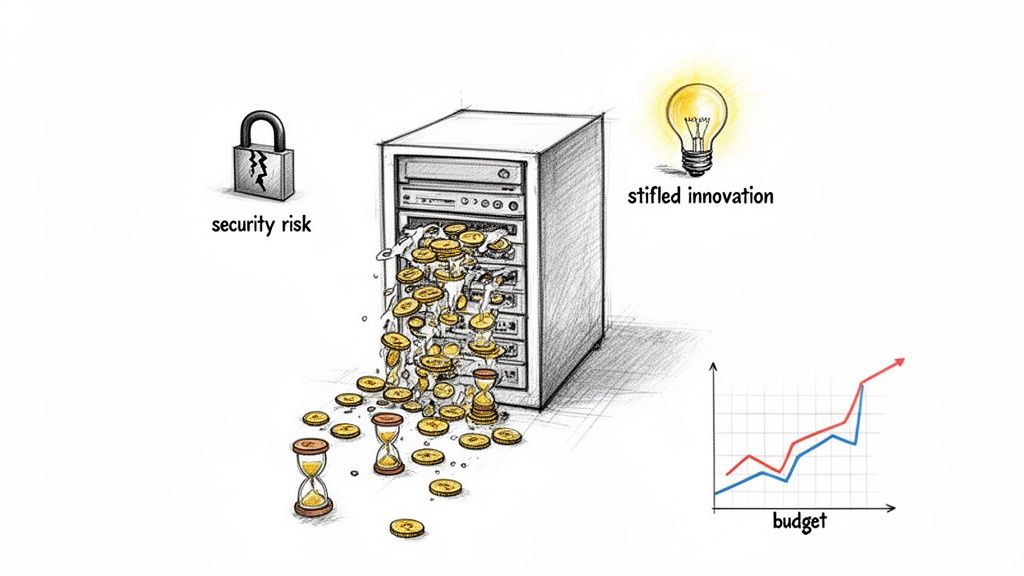
It’s a perfect visual for connecting the dots between old tech and the real-world problems it creates. Modernization isn't just an expense; it's the solution.
Stifled Innovation and Missed Opportunities
Perhaps the biggest cost of all is the one you can't see on a balance sheet: all the missed opportunities. Legacy systems kill agility. While your competitors are rolling out new features and responding to market shifts in a matter of weeks, your rigid architecture might take months to deploy even a small change.
This tech-induced inertia puts you at a serious competitive disadvantage. It stops you from integrating with modern APIs, experimenting with AI, or moving to cloud-native solutions that could open up entirely new ways to make money. To get a better sense of the upside, it’s worth seeing how other businesses are thriving by modernizing outdated IT systems.
Ultimately, the choice to modernize isn't just an IT project. It’s a core business strategy for staying relevant and growing in today's market.
How to Properly Assess Your Legacy Application
You can't fix what you don't understand. Before you even think about planning a migration or writing a single line of new code, you have to do a deep, honest audit of your legacy system. I’ve seen it happen too many times: teams jump into a modernization project without a clear picture of what they’re dealing with, and it becomes a surefire recipe for budget overruns and blown deadlines.
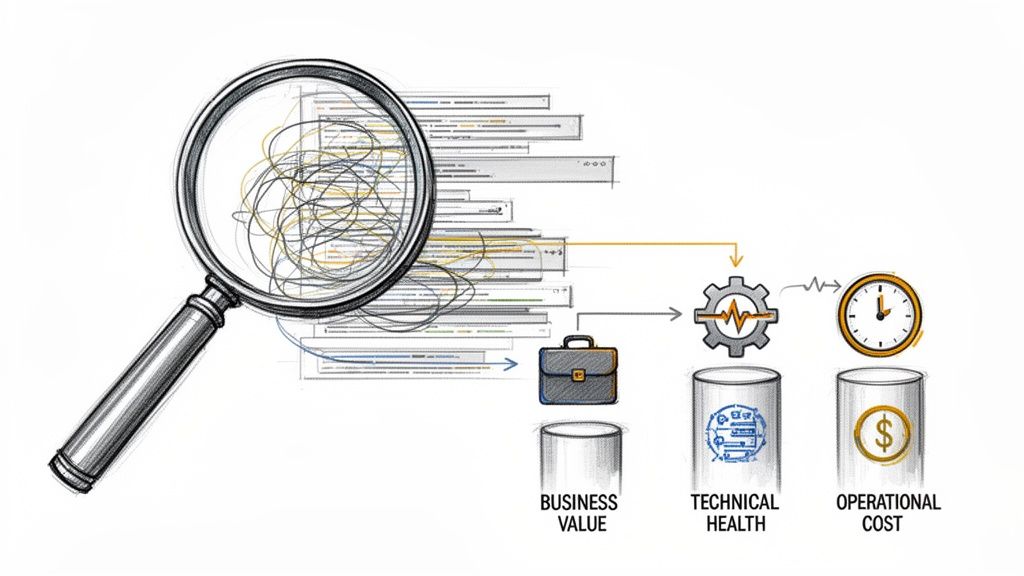
This initial assessment is the bedrock for every single decision that follows. It isn't just about looking at old code, either. A proper evaluation stands on three critical pillars: business value, technical health, and operational cost. Getting this right means moving beyond gut feelings and into a data-driven approach that gives everyone an unbiased view of the landscape.
Uncovering the True Business Value
First things first, you need to figure out how critical this application is to your daily business operations. Does it run core, revenue-generating functions? Or is it a peripheral tool that could be swapped out without much fanfare? This isn't just an IT exercise; you need direct input from the business units that live in this software every day.
Start by mapping the application's features to specific business processes. A great way to kick this off is by asking some pointed questions:
- Which business processes would grind to a halt if this application went offline tomorrow? This immediately highlights its most vital functions.
- How does this system actually contribute to revenue or customer satisfaction? Try to put a number on it, even if it's a rough estimate.
- What unique capabilities does it give us that off-the-shelf software just can't? This helps you understand its real strategic importance.
The answers will help you slot the application into a category. A high-value, mission-critical system obviously warrants a much more careful and significant investment. A low-value application, on the other hand, might just be a candidate for a simple replacement or retirement.
Gauging the Technical Health and Debt
Alright, now it’s time to pop the hood and see what’s really going on with the engine. Assessing technical health is about more than just identifying the programming language. You need a real feel for the code's complexity, how easy (or impossible) it is to maintain, and its overall stability. This is where you translate that abstract idea of technical debt into concrete, solvable problems.
Your technical audit should produce cold, hard metrics. Look for tools that can analyze your codebase and measure things like cyclomatic complexity (a fancy term for how convoluted the code is) and code coverage (how much of it is actually being tested). Documenting all the dependencies is also absolutely crucial—many teams I've worked with were shocked to find their "monolith" relied on an obscure, unsupported library that no one even remembers implementing.
A thorough technical assessment turns vague complaints like "the code is a total mess" into a quantifiable report with metrics a CFO can understand. It transforms subjective opinions into an objective case for change.
Calculating the Total Cost of Ownership
Finally, you need to run the numbers on the true total cost of ownership (TCO). This is often the most eye-opening part of the whole assessment because it pulls back the curtain on the hidden financial drain of legacy systems. The TCO isn't just server costs or software licenses.
Your calculation must include:
- Direct Costs: The obvious stuff, like hardware, software licenses, and hosting fees.
- Maintenance Costs: The salaries of the developers who spend most of their time just fixing bugs and patching the system to keep it running.
- Indirect Costs: This is the big one. Calculate the hours your team wastes on manual workarounds because the system can't automate a process. Quantify the lost revenue from system downtime or sluggish performance.
Once you have this complete picture, you can accurately define the project's boundaries and objectives. A well-defined scope is what separates a successful modernization from a project that spirals completely out of control. For a deeper dive into this, our guide on how to define project scope provides an excellent framework for this crucial step.
By analyzing these three pillars—business value, technical health, and operational cost—you create a comprehensive report. This document becomes your playbook, guiding your strategy and ensuring your efforts are focused on what truly matters.
Choosing Your Modernization Path With The 5 R's
Once you’ve thoroughly evaluated your legacy system, you'll have a solid grip on its health and business value. Now comes the hard part: deciding how to modernize it. This isn’t a simple choice; the right path is a careful balance between your goals, budget, and how much risk you're willing to take on.
This decision is at the center of a booming industry. The global legacy application modernization market is on track to jump from $16.71 billion in 2024 to an impressive $32.71 billion by 2029. Why the surge? Companies are finally realizing that old, clunky systems are a massive drag on innovation and agility.
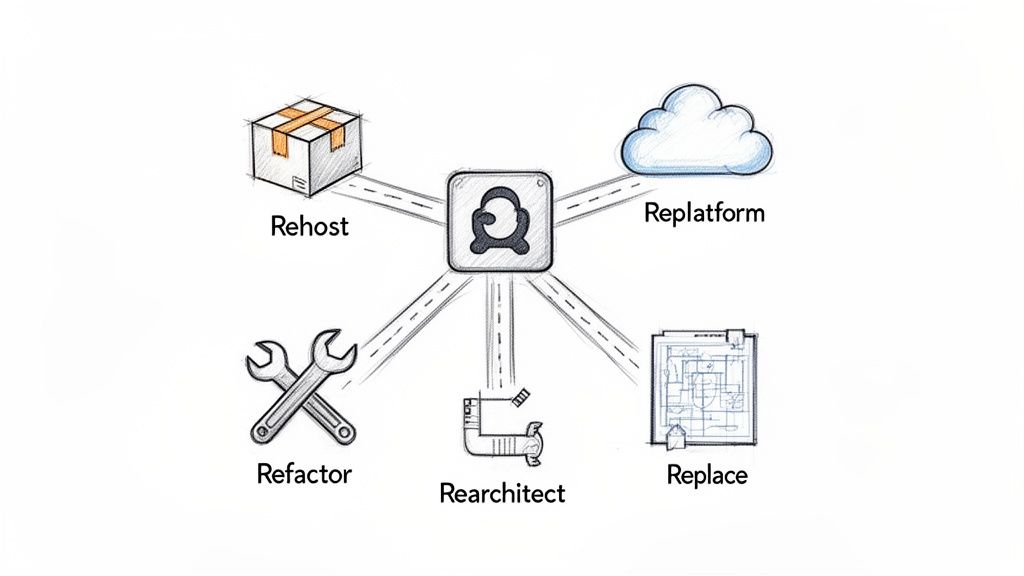
To make sense of the options, we can use a framework known as the "5 R's" of modernization: Rehost, Replatform, Refactor, Rearchitect, and Replace. Each one represents a different level of effort and brings its own set of trade-offs.
Rehost: The "Lift-and-Shift"
Rehosting is the quickest and simplest way to get started. Think of it as moving—you’re packing up your application as-is and moving it from your on-premise servers to a cloud environment like AWS or Azure. Nothing inside the boxes changes.
Often called "lift-and-shift," this strategy requires no code modifications. The big wins here are speed and a low initial cost. It’s a great move if your primary goal is to get out of your data center fast or to start tapping into basic cloud benefits like scalability.
But let's be clear: rehosting doesn’t actually fix anything. You’re still running the same old application, just in a new home. It’s a solid first step, but it's rarely the final destination.
Replatform: The Small Tweak
Replatforming takes things a bit further. It's like moving into that new house and deciding to swap your old, clunky appliances for more modern, efficient ones. You're not gutting the kitchen, just making smart, targeted upgrades.
In practice, this means making a few small optimizations so the application can take better advantage of the cloud. This could be as simple as switching to a managed database service or a cloud-native messaging queue. The core architecture stays the same, but you get a noticeable boost in performance and operational efficiency. It’s a great middle ground.
Refactor: The Strategic Renovation
This is where the real modernization work begins. Refactoring is a much deeper process. Imagine keeping the basic layout of your application but completely overhauling the internals—improving the code, reducing technical debt, and making it easier to manage.
The goal here is to restructure and optimize your existing code without changing what it does on the outside. You’re making it more efficient, more secure, and far easier for developers to work on. This is the perfect approach for a high-value application that’s become a tangled mess over the years. It’s a serious investment, but the payoff in long-term agility is huge.
By refactoring, you're not just fixing bugs; you're investing in the future maintainability of your most critical software assets. It turns a brittle, complex codebase into a flexible and resilient one.
When considering how to tackle your legacy systems, it's crucial to understand the full spectrum of available application modernization strategies.
Rearchitect and Replace: The Full Overhaul
Finally, we have the most intensive options. Rearchitecting and Replacing are fundamentally different because they involve a complete transformation of the application.
Rearchitecting: This is like tearing down your old application and rebuilding it from the ground up with a modern design, often moving from a single monolith to a more flexible microservices architecture. This gives you maximum scalability and agility, but it's also the most complex and riskiest path.
Replacing: Sometimes, the best option is to start fresh. Here, you retire the old system completely and replace it with something new—either an off-the-shelf SaaS product or a custom-built application. This makes sense when the legacy system is so outdated it no longer meets business needs and isn't worth saving.
To help you visualize these trade-offs, here’s a quick comparison of the five strategies.
Comparing the 5 R's of Application Modernization
| Strategy | Description | Typical Cost | Risk Level | Timeline | Best For |
|---|---|---|---|---|---|
| Rehost | Move the application to the cloud "as-is" with no code changes. | Low | Low | Weeks | Quick data center exits or starting a cloud journey. |
| Replatform | Make minor cloud-specific optimizations without changing the core architecture. | Low-Medium | Low | Months | Gaining quick wins and performance boosts with minimal effort. |
| Refactor | Restructure and optimize existing code to improve non-functional attributes. | Medium | Medium | 6-12 Months | High-value apps with significant technical debt that need to be more agile. |
| Rearchitect | Fundamentally alter the architecture, often moving to microservices. | High | High | 12+ Months | Critical monolithic applications that need maximum scalability and flexibility. |
| Replace | Decommission the old system and build or buy a new one. | High | High | 12+ Months | Applications that are no longer viable or aligned with business goals. |
Choosing the right path from these five options is a strategic decision. You have to weigh the insights from your initial assessment—business value, technical health, and total cost of ownership—against your budget, timeline, and long-term goals. A low-value app with high technical debt is a prime candidate for replacement, while a stable, high-value system might only need a rehost or replatform to meet your immediate needs. This decision-making framework is absolutely key to a successful modernization project.
Crafting a Realistic Modernization Roadmap
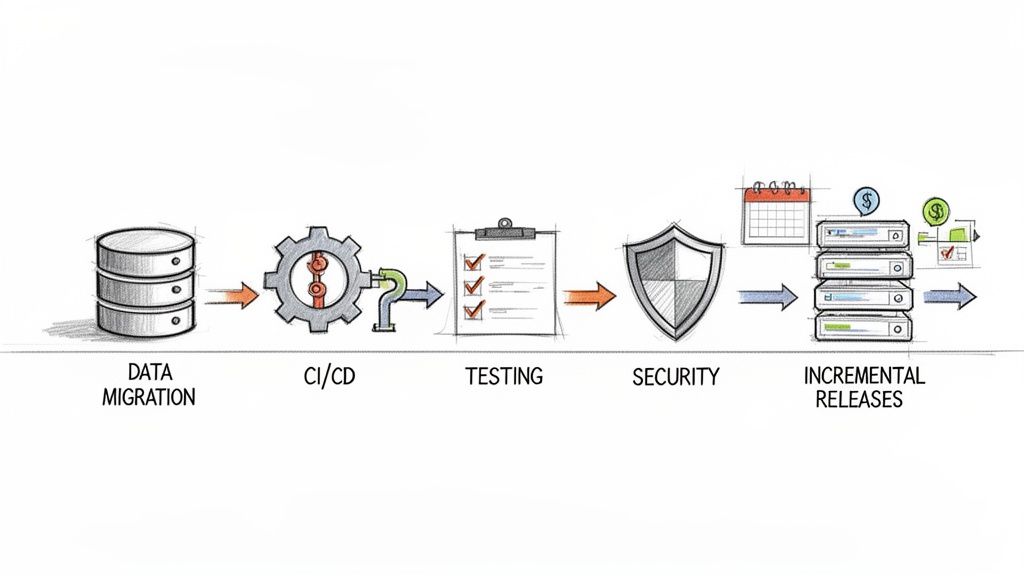
Alright, you've picked a modernization strategy. That’s a huge step, but don't pop the champagne just yet. An idea without a solid plan is a recipe for disaster—think scope creep, blown budgets, and a team that's completely burned out. Now comes the real work: turning that high-level strategy into a concrete, actionable roadmap.
This isn't just a fancy GANTT chart for the tech team. A good roadmap is a communication tool. It’s how you get your developers and business stakeholders on the same page, ensuring everyone understands what’s happening, when it’s happening, and the value it delivers. It needs to cover everything from handling decades of messy data to safely deploying the new system without breaking the business.
Architecting Your Data Migration Plan
Let's start with the one thing that gives every CTO nightmares: data migration. Get this wrong, and you're looking at data loss, corruption, and downtime that can completely torpedo the project's credibility. Your plan here needs to be rock-solid.
First, you have to get your hands dirty with data discovery and mapping. You need to crawl through the legacy system, identify every piece of data, understand its structure, and then map it to the new system's schema. This is where you’ll often find treasure troves of redundant or obsolete data that can be archived or just deleted, which instantly simplifies the migration.
Once you have that map, you’ve got a choice to make on the approach:
- Big Bang Migration: You move everything at once over a weekend or a planned outage. It sounds simple, but it’s incredibly high-risk. If anything goes wrong, rolling back is a nightmare.
- Trickle Migration: You move data in phases or in small, continuous batches. This method is more complex to set up, but it dramatically lowers your risk profile and minimizes downtime.
Honestly, for any system that's critical to your business, the trickle approach is the only sane choice. You can use tools to keep data synced between the old and new systems for a while. This lets you validate the new system with live, real-world data before you finally cut the cord.
Implementing Modern DevOps Practices
You can’t bolt a modern, cloud-native application onto an old, manual deployment process. It just doesn't work. To get the agility and speed you're after, a robust Continuous Integration and Continuous Delivery (CI/CD) pipeline is absolutely essential.
A CI/CD pipeline automates the entire process of building, testing, and deploying your code. A developer commits a change, and automated tests immediately kick in to find bugs. If it all checks out, the code can be automatically pushed to a staging environment or even to production. This creates a fast, reliable, and, most importantly, repeatable process.
Don't treat your CI/CD pipeline as an afterthought. Build it from day one, right alongside your new application. Think of it as the factory floor for your software—a well-oiled factory produces better products, faster.
Forging a Multi-Layered Testing Strategy
When you're modernizing, your testing strategy has to be more than just checking a few boxes. You need a multi-layered approach to prove the new system works on its own and that it plays nicely with the old system during the transition.
Your testing strategy should look something like this:
- Unit Tests: Verify the smallest pieces of code and individual functions.
- Integration Tests: Make sure different parts of the new application work together as expected.
- End-to-End (E2E) Tests: Simulate real user journeys through the entire system.
- Performance and Load Tests: Ensure the new system won't fall over when real traffic hits.
There's one more layer that I've seen teams miss, and it’s a critical one: regression testing against the legacy system. You have to run the same inputs through both the old and new systems and compare the outputs. This is your ultimate safety net. It proves your new logic correctly replicates the essential business rules you can't afford to get wrong. To see how this fits into the bigger picture, take a look at our guide on how to create a product roadmap.
Setting Timelines and Managing Expectations
Finally, every roadmap has to answer the tough questions about time and money. Here’s a staggering fact: 70% to 80% of most IT budgets are spent just keeping the lights on for legacy systems. That's the financial pressure that makes this work so important. Get it right, and the ROI can be massive—like the U.S. parts manufacturer that cut its maintenance costs by 40% after modernizing.
Don't plan a two-year "big bang" project that delivers nothing until the end. Break the work into phases, with each one delivering tangible value. This approach lets you show progress, keep stakeholders happy, and adjust your plan based on what you learn. Aim for quarterly milestones that either launch a new feature or kill off a piece of the old system. This makes the whole initiative feel manageable and demonstrates continuous forward momentum.
Using Nearshore Teams to Accelerate Your Project
Let's be realistic: modernizing a legacy application is a beast of a project, and most in-house teams just aren't built for it. These initiatives demand a very specific, and often temporary, mix of skills—deep expertise in a particular cloud platform like AWS or Azure, a knack for microservices architecture, or even fluency in an old, obscure programming language. This is precisely where bringing in outside help can make or break your timeline.
Trying to hire full-time specialists for these roles is a classic trap. You burn months in recruitment cycles, lose precious project momentum, and then you're stuck with an over-inflated payroll once the modernization push is over. This is the exact problem nearshore software development solves. It’s about getting the right talent, right now, without the long-term overhead.
The Nearshore Advantage in Modernization
When people hear "outsourcing," they often think of teams halfway across the world, which comes with its own set of headaches. The nearshore model is different. It’s about partnering with teams in nearby countries with similar time zones—for a US company, that usually means tapping into the talent pool in Latin America. This proximity creates some powerful advantages, especially for a project as complex as modernization.
- Time-Zone Alignment: This is the big one. When your augmented team works the same hours you do, collaboration happens in real-time. No more waiting 24 hours for an answer to a simple question. Daily stand-ups are actually daily stand-ups, and you can solve problems as they arise.
- Cultural Affinity: Working with teams that share similar business etiquette and cultural norms just makes everything smoother. Communication flows more easily, there’s less friction, and it genuinely feels like one cohesive team driving toward the same goal.
- Seamless Collaboration: Overlapping workdays mean your in-house and nearshore engineers can actually work together. Think pair programming, instant code reviews, and spontaneous brainstorming sessions—the kind of collaboration that’s nearly impossible with significant time differences.
This isn’t about just throwing tasks over a wall. It's about surgically adding specialized firepower to your existing crew so they can hit the ground running.
Partnering with a nearshore team isn't just about filling a skills gap; it’s about injecting velocity into your project. You bypass the hiring bottleneck and gain immediate access to a pool of vetted talent ready to tackle your specific modernization challenges.
A Practical Scenario: Overhauling a Legacy CRM
Picture a mid-sized logistics company running on a 15-year-old on-premise CRM. It’s clunky, can't connect to modern APIs, and the developers who built it are long gone. The current IT team is great at keeping the lights on, but they have zero experience with cloud migration or the microservices architecture the company wants to move to.
Instead of starting a six-month search for a cloud architect, the CTO engages a nearshore partner. In just two weeks, they onboard three new experts: an architect with deep AWS experience and two senior developers who have a track record of untangling monolithic applications.
The new specialists immediately start working with the in-house team, not in a silo. The company's developers provide the critical domain knowledge—the "why" behind the CRM's weird business logic. Meanwhile, the nearshore experts drive the technical strategy. They design the new cloud infrastructure on AWS, build out the CI/CD pipeline, and start chipping away at the monolith using the Strangler Fig pattern.
Because everyone is in the same time zone, daily syncs are quick and productive. The combined team swarms on problems as they pop up. The result? The project's first major milestone—a brand new, cloud-native customer data module—is launched a full month ahead of schedule.
By the end, the company has a fully modernized CRM, delivered under budget and faster than anyone expected. Better yet, the in-house team leveled up their own skills by working side-by-side with the experts. This is the real power of nearshore augmentation: it's not just a stopgap, it's a strategic accelerator.
Frequently Asked Questions About Legacy Modernization
Even with the best-laid plans, a modernization project is going to spark some questions. That's a good thing—it means your team is engaged. Let's walk through some of the most common questions I've heard over the years and give you straight, practical answers.
How Do I Know if My Application Is a Legacy System?
It's not just about age. A system officially earns the "legacy" label when it starts actively hindering your business. Think of it less as a technical problem and more as a business bottleneck. If your system is built on outdated tech, is a money pit to maintain, or has documentation that’s more myth than manual, you're dealing with a legacy system.
The real tell-tale signs are operational headaches. Ask yourself these questions:
- Is finding developers who know this technology like searching for a needle in a haystack?
- Does a simple feature change take months when it should take days?
- Is connecting to modern APIs a constant, painful struggle?
- Is the system buckling under pressure, unable to scale with customer demand?
If you found yourself nodding along, you don't just have an old application—you have a business liability that needs a plan.
What Is the Biggest Risk in a Modernization Project?
Surprisingly, the biggest risk isn't technical. It’s failing to tie the project to concrete business outcomes. When modernization becomes a tech-for-tech's-sake endeavor, scope creep is almost guaranteed. The project slowly morphs into an endless cycle of improvements that never quite delivers a return on investment.
Another major landmine is a poorly executed data migration. Mess that up, and you're looking at data loss, corruption, and serious business disruption. You can get ahead of both risks by starting with a deep-dive assessment and using a phased approach, like the Strangler Fig pattern, to transition bits and pieces of the system safely over time.
The projects that succeed are always framed as business initiatives, not IT overhauls. They have clear goals like "cut customer onboarding time in half" or "slash maintenance costs by 30%."
Can I Modernize an Application Without Downtime?
Absolutely. In fact, for any business-critical system, a zero-downtime migration should be the standard you aim for. Modern deployment strategies were practically invented to solve this exact problem.
We have a whole toolkit for this now. Techniques like Blue-Green deployment (where you have two identical live environments) and Canary releases (where you slowly introduce the new version to a small group of users) are fantastic. The Strangler Fig pattern is especially powerful here, letting you build new services around the old core and reroute traffic incrementally until the legacy system is no longer needed.
How Long Does a Typical Modernization Project Take?
This is the classic "it depends" question. The timeline is completely tied to the strategy you pick. A simple Rehost (a "lift-and-shift" to the cloud) could be done in a few months. On the other hand, a full Replace or a ground-up Rearchitect can easily stretch over a year or more.
The secret is to avoid the "big bang" approach—those massive, multi-year projects that show no progress until the very end. Break the work down into smaller, self-contained phases. Each phase should have its own clear milestones and deliver tangible value. This keeps everyone bought-in, lets your team learn as they go, and builds the momentum you need to see the project through to the finish line.