Elevate Your DevOps with software deployment strategies
At its core, a software deployment strategy is simply the plan your team follows to get new code from a developer's machine into the hands of your users. Choosing the right plan is what separates smooth, predictable releases from those late-night, high-stress fire drills. It's the key to shipping updates safely and reliably, keeping downtime to a minimum, and avoiding catastrophic bugs.
Why Your Deployment Strategy Matters

Pushing code to production isn’t just a technical step; it’s a critical moment that directly shapes your customer's experience. We’ve all been there: the old-school "big bang" deployment. The entire team holds its breath as massive, risky updates go live all at once, usually in the dead of night. This approach almost always led to painful rollouts, long outages, and chaotic debugging sessions.
Thankfully, modern software development has moved on. The goal today isn't just to ship features but to deliver value continuously, without disrupting the user experience. A well-chosen deployment strategy is your roadmap for making that happen.
Think of it like this: a "big bang" release is like trying to launch a massive, untested ship in a single, dramatic event. A modern deployment strategy is more like sending out a small, agile fleet of boats—you test each one, gather feedback, and ensure the entire fleet is seaworthy before committing to the full voyage.
The Shift to Controlled Rollouts
Today’s most effective engineering teams are all about control and minimizing risk. They know a botched deployment can destroy user trust and hit the bottom line. By embracing controlled, incremental rollouts, they've unlocked some serious advantages.
This strategic shift empowers teams to:
- Minimize Downtime: Deployments can happen during peak business hours with little to no impact on active users.
- Reduce Risk: You can expose new code to a tiny fraction of users first, catching bugs before they become a widespread problem.
- Accelerate Delivery: Small, frequent updates are far easier to manage, test, and troubleshoot, which means you can get new features to market faster.
- Enable Faster Rollbacks: If something does go wrong, a solid strategy lets you revert to a stable version almost instantly.
Ultimately, picking the right deployment strategy transforms releases from a source of anxiety into a predictable, almost boring, routine. For any CTO, engineering lead, or product manager, mastering these techniques is fundamental to building a product that can evolve quickly and reliably. This guide will walk you through the most common strategies to help you make that choice.
Comparing the Most Common Deployment Strategies
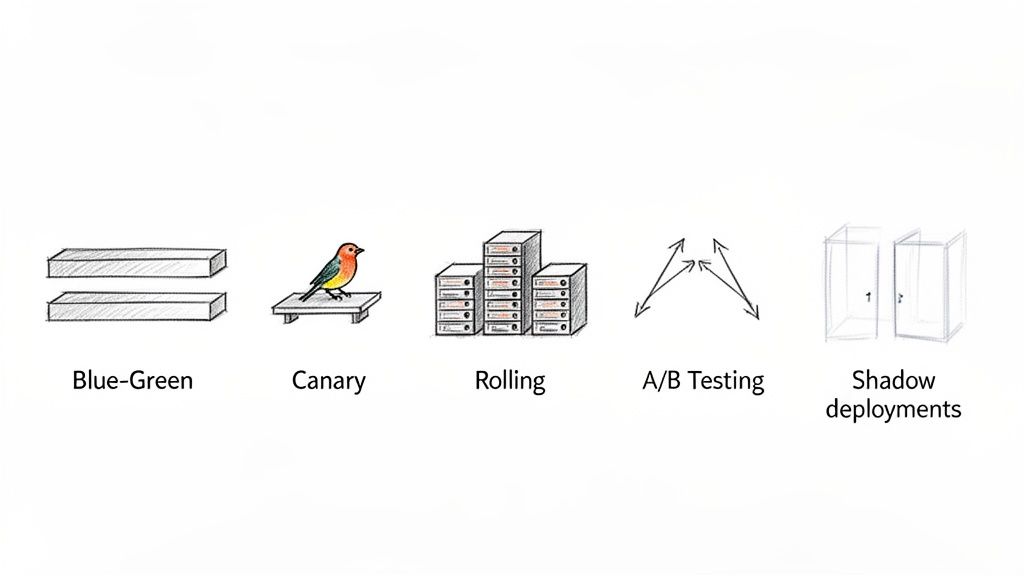
Picking a deployment strategy is a lot like choosing the right tool for a job. You wouldn't use a sledgehammer to hang a picture, and you definitely shouldn't use a risky, all-at-once deployment for your most critical application. Each strategy strikes a different balance between speed, safety, and cost, and understanding these tradeoffs is the first step to building a rock-solid release process.
The shift to modern, controlled rollouts has really been kicked into high gear by the cloud. Traditional on-premise releases have been largely replaced by cloud-first strategies, changing the game for how we release and scale software. In fact, cloud deployments already account for about 71.5% of software development market revenue and are only expected to grow.
Let's dig into the most common methods and see how they really stack up.
The Blue-Green Deployment Strategy
Think of this like a stage production with two identical, perfectly mirrored stages: "Blue" and "Green." Your live application is the Blue stage, where all your users are watching the performance. Meanwhile, behind the curtain, your team is setting up the Green stage with the next version of your app.
Once everything on the Green stage is tested and ready to go, you don't slowly swap out the actors. Instead, you just flip a switch, and the master spotlight instantly moves from Blue to Green. The audience sees a seamless transition, and you keep the old Blue stage on standby, ready for an instant switch-back if anything goes wrong.
Blue-Green Deployment is all about running two identical production environments. The "Blue" one is live, while the "Green" one hosts the new version. Once Green is ready, a router instantly flips all traffic over to it.
The Upside:
- Instant Rollback: If the new version has a bug, you just flip the router back to Blue. It’s the fastest, cleanest rollback you can get.
- Zero Downtime: Because the switch is instantaneous, your users don't feel a thing. No maintenance windows, no service interruptions.
- Full-Scale Testing: You can hammer the Green environment with all kinds of tests in a true production-like setting before a single user touches it.
The Downside:
- High Cost: This is the big one. You're effectively doubling your production infrastructure, and that gets expensive fast.
- Database Headaches: Keeping database schemas and data in sync between two active environments can be a massive challenge, especially with breaking changes.
The Canary Deployment Strategy
The name comes from the old "canary in a coal mine" practice. Miners would bring a canary into the mine, and if it got sick, they knew dangerous gases were present and it was time to evacuate. In software, we do the same thing, but our "canaries" are a small group of real users.
You start by directing a tiny fraction of your traffic—maybe just 1% or 5%—to the servers running the new code. Everyone else stays on the stable, old version. Your team then watches that canary group like a hawk, monitoring for errors, performance dips, or any negative signs. If the canaries are happy, you gradually increase the traffic to the new version—10%, 50%, and finally 100%.
The Rolling Deployment Strategy
Imagine you're upgrading a fleet of delivery trucks. Instead of taking them all off the road at once, you upgrade them one by one. You pull one truck into the garage, install the new engine, and send it back out. You repeat this until the whole fleet is modernized.
That’s a rolling deployment. You slowly replace instances of the old application version with the new one. If you have ten servers, you might update two at a time. For a while, you'll have a mix of old and new versions running together. It's a simple, common approach, especially when your application can handle having both versions active simultaneously. Getting this right often depends on your container setup, so knowing the ins and outs of Docker vs Kubernetes for container management is a huge plus.
The A/B Testing Strategy
People often mix this up with Canary deployments, but their goals are totally different. A/B testing isn't about ensuring stability; it's about measuring impact. Here, you're deploying different versions of a feature to see which one performs better against a key business metric.
- Version A (The Control): The current version of your feature.
- Version B (The Challenger): The new version you want to test.
You route users to A or B based on certain criteria (like their location, device, or just a random coin flip). This gives product teams hard data on what users actually prefer, letting them make decisions based on evidence, not just gut feelings.
The Shadow Deployment Strategy
A shadow deployment is like having a new pilot fly a simulator that's fed real-time flight data. The pilot thinks they're flying a real plane, but they have no actual control. Their actions have zero impact on the actual flight.
Here, you deploy the new version alongside the old one. Real production traffic is sent to the old version, and the user gets their response as usual. But, a copy of that same traffic is also sent to the new "shadow" version. The shadow version's response is recorded and analyzed but never sent back to the user. This lets you test how the new code performs under a real production load, catching performance issues or bugs without any risk to your users.
Deployment Strategy Decision Matrix
Choosing the right strategy comes down to balancing risk, cost, and speed. This table breaks down the key differences to help you decide.
| Strategy | Risk Level | Infrastructure Cost | Deployment Speed | Best For |
|---|---|---|---|---|
| Blue-Green | Low | High | Instantaneous | Mission-critical apps where downtime is not an option. |
| Canary | Very Low | Medium | Gradual | Validating new features with real users with minimal impact. |
| Rolling | Medium | Low | Gradual | Stateless apps where temporary version mix is acceptable. |
| A/B Testing | Low | Medium | Parallel | Data-driven product decisions and feature optimization. |
| Shadow | Very Low | High | Parallel | Performance testing and validating high-risk backend changes. |
Ultimately, there's no single "best" strategy—it all depends on your product, your team's expertise, and your risk tolerance. The most advanced teams often mix these techniques, like using feature flags to run a Canary release inside a Blue-Green environment for the ultimate safety net.
By understanding these core patterns, you're in a much better position to build a deployment pipeline you can trust. If you're ready to take the next step and automate your release process, our guide on https://getnerdify.com/blog/what-is-continuous-deployment is a great place to start.
How to Choose the Right Strategy for Your Project
Picking the right deployment strategy isn't about finding some single, perfect answer. It’s about making a smart match. The best method for your project is the one that fits its unique DNA—your app's architecture, what your team can handle, and what your business is trying to achieve. A strategy that's a game-changer for a massive e-commerce site might be total overkill for a startup just getting off the ground.
Think of it like a diagnostic process. You need to ask the right questions to understand your project's context before you can pick the right "treatment." Let's walk through the essential factors to consider.
Start with Your Application Architecture
How your application is built is the biggest technical factor, period. A monolith, where everything is one big, interconnected unit, has completely different deployment needs than a system built on microservices.
For Monoliths: A Rolling deployment is often the most practical place to start. It’s simple and doesn't require a ton of extra infrastructure. But if you absolutely cannot afford any downtime, a Blue-Green strategy is a much safer bet. It costs more, but it gives you that instant rollback capability for the entire application.
For Microservices: This is where you get much finer control. A Canary release is usually a perfect fit because you can test a single updated service on a small slice of your users. This keeps risk contained, so one buggy service doesn't tank the whole system.
Where your application lives also plays a huge role. Even with the cloud being so common, many companies still rely on on-premise servers, especially in the U.S. where data sovereignty rules and legacy system integrations are common. This often forces teams to get creative and blend different deployment approaches to make everything work.
Look at Your Team and Traffic
Next, you have to be realistic about your team's size and your user traffic. The constraints on a small, scrappy startup team are worlds away from those on a large, distributed enterprise team.
If you're a startup with low traffic, the simplicity of a Rolling deployment is probably your best friend. The impact of a small bug just isn't that high. On the other hand, if you're managing a platform with millions of users, stability is everything. For those high-stakes environments, a Canary or Blue-Green deployment isn't a luxury; it's a necessity. Even a few minutes of downtime can be incredibly expensive.
The right strategy respects your operational reality. Forcing a complex Canary release on a team without robust monitoring tools is a recipe for disaster. It's better to master a simpler strategy than to poorly execute an advanced one.
Define Your Appetite for Risk
Every business has a different tolerance for risk, and your deployment choice should reflect that. You have to ask the tough question: what's the real-world impact if a deployment goes wrong?
High Risk Tolerance: If you're working on an early-stage product or an internal-facing tool, you can probably afford a few bumps in the road. A simple, fast deployment process often makes more sense than a complex, zero-downtime one.
Low Risk Tolerance: For mission-critical systems—think banking platforms or healthcare apps—you have to minimize risk at all costs. This is where Shadow and Canary deployments really shine. They let you validate new code with real production traffic without ever exposing your users to potential bugs.
Finally, any deployment decision should be part of a solid IT change management process. This gives you a structured way to handle any changes to your systems, ensuring every release is documented, approved, and lined up with what the business needs. By carefully thinking through your architecture, team, traffic, and risk, you can confidently pick a strategy that gets new features out the door safely and efficiently.
Building Your Deployment Pipeline with Modern Tools
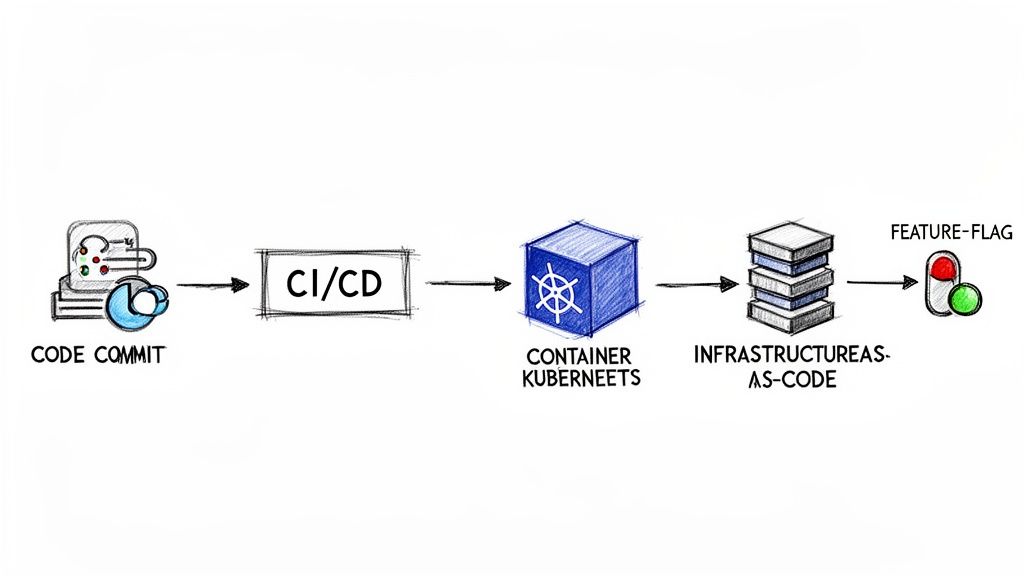
A great deployment strategy is just a blueprint; the real magic happens when you bring it to life with the right tools. Building an automated pipeline transforms your release process from a manual, error-prone chore into a predictable, efficient engine for delivering value. It’s the assembly line that connects your developer’s code to your customer’s screen.
Modern DevOps practices, powered by CI/CD, have completely changed the pace of software delivery. We've moved far beyond the days of slow, quarterly releases. This push for speed is fueling serious market growth—the global application development and deployment software segment is projected to hit nearly USD 19.7 billion, all driven by the high demand for these rapid, automated pipelines. You can dig into the numbers yourself in the full industry report on Emergen Research.
Let's break down the core components of a modern deployment pipeline and see how each piece fits together to make your deployment strategies a reality.
Automating the Flow with CI/CD Platforms
At the heart of any modern deployment pipeline is Continuous Integration/Continuous Deployment (CI/CD). This practice automates the entire journey from code to customer, making sure every change is thoroughly checked before it ever goes live.
Think of CI/CD as your pipeline's tireless quality control inspector and delivery driver, rolled into one. The moment a developer commits new code, the CI server automatically kicks into gear.
The process usually follows these steps:
- Code Commit: A developer pushes a change to a shared repository like Git.
- Automated Build: The CI tool, something like GitLab CI or GitHub Actions, compiles the code.
- Unit & Integration Tests: A suite of automated tests runs to catch bugs early on.
- Deployment: If all tests pass, the CD part of the pipeline takes over, pushing the code to a staging or production environment.
This level of automation is a cornerstone of effective DevOps and is essential for implementing the deployment strategies we've discussed. To see how this fits into the bigger picture, check out our guide on agile software development best practices.
Managing Environments with Orchestration and IaC
As applications get more complex, just managing the servers they run on becomes a major headache. Configuring servers by hand is slow and almost always leads to inconsistencies. Thankfully, two key technologies solve this: container orchestration and Infrastructure as Code (IaC).
Container Orchestration with Kubernetes
Containers (like Docker) bundle your app and all its dependencies into a single, portable unit. Kubernetes is the tool that manages these containers at scale. It handles deploying, scaling, and operating your application containers across clusters of machines. It’s like an air traffic controller for your application, making sure everything runs smoothly.
Infrastructure as Code (IaC) with Terraform
Infrastructure as Code (IaC) is exactly what it sounds like: you define your entire infrastructure—servers, databases, networks—in configuration files. Tools like Terraform read these files and automatically build the exact environment you've described. This makes your infrastructure reproducible, version-controlled, and easy to tweak, finally putting an end to those "it works on my machine" problems.
By combining Kubernetes and Terraform, you create a powerful, automated foundation for your deployment pipeline. Terraform builds the stage (your infrastructure), and Kubernetes directs the actors (your application containers).
Decoupling Releases with Feature Flags
One of the most powerful tools in a modern deployment toolkit is the feature flag (also called a feature toggle). A feature flag is essentially an on/off switch for a piece of code inside your application, which you can flip without deploying anything new.
This simple idea completely changes the game by separating code deployment from feature release.
Here’s why that’s such a big deal:
- Test in Production Safely: You can deploy an unfinished feature to production but keep it hidden behind a flag. Only your internal team can see it, allowing you to test it in a real-world environment.
- Enable Canary Releases: You can activate a new feature for just 1% of your users, watch its performance, and then gradually roll it out to everyone else simply by adjusting the flag.
- Instant Kill Switch: If a new feature causes problems, you can instantly turn it off with a single click. No emergency rollback needed.
Feature flags give you incredibly fine-grained control over your releases, acting as the final safety net in your pipeline. They give teams the confidence to move faster with far less risk, making advanced deployment strategies accessible to everyone.
Monitoring Deployments and Planning for Rollbacks
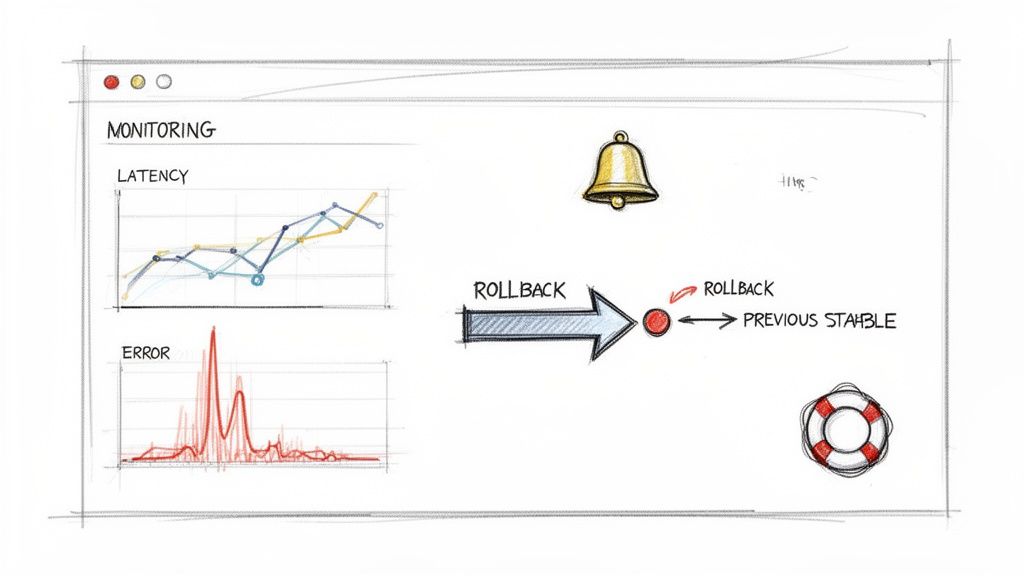
Pushing new code to production isn’t the finish line—it’s the starting gun. The first few minutes and hours after a release are the most telling. This is when you find out if all that careful testing paid off or if a nasty bug is about to ruin someone’s day. A solid monitoring setup and a well-rehearsed rollback plan aren’t just nice-to-haves; they’re essential parts of any professional deployment strategy.
Think of it like a mission to space. The launch is just the beginning. After liftoff, mission control is glued to their screens, tracking every bit of telemetry to make sure the spacecraft is healthy and on course. Your team needs to do the same, watching for the vital signs of your new release and being ready to act at a moment's notice.
Key Metrics to Monitor After a Deployment
Right after a deploy, your team should have its eyes on a specific dashboard, watching the metrics that give you a clear picture of application health and user experience. While every system is unique, you’ll want to track a mix of technical and business indicators. For a deeper look, it's worth exploring some application monitoring best practices to get your framework right.
Here’s what should be on your immediate post-deployment checklist:
- Application Performance Metrics (APM): This is your system’s EKG. You need to be watching latency (how long requests take), throughput (requests per minute), and CPU/memory utilization. A sudden spike in any of these is a classic red flag.
- Error Rates: Keep a hawk-eye on your logs for HTTP 5xx server errors and 4xx client errors. A jump in these numbers is a clear sign that your new code is struggling to handle real-world traffic.
- Business KPIs: Technical health is only half the equation. Are people still able to do what they came to your app to do? Monitor metrics like user sign-ups, conversion rates, or items added to a cart. A sudden dip here can expose a critical bug that APM tools might miss.
A deployment is only successful if it improves things for the user without breaking anything. Monitoring is how you prove it. Without it, you're just flying blind.
Why a Rollback Plan Is Non-Negotiable
Let's be real: no matter how much you test, some bugs are going to make it to production. It happens. When it does, your ability to react quickly and calmly is what separates a minor hiccup from a full-blown outage. A rollback plan is your emergency eject button—a pre-defined, automated way to switch back to the last stable version.
Your rollback process should be just as automated as your deployment process. Trying to manually undo a release while alarms are blaring is a recipe for disaster. Instead, your CI/CD pipeline should have a one-click rollback feature baked right in. For a Blue-Green deployment, this is as simple as re-pointing the load balancer back to the "Blue" environment.
The best teams don't just have a plan; they practice it. Running regular "rollback drills" ensures the automation works as expected and everyone on the team knows exactly what to do. This builds the muscle memory needed to handle a real incident without panic, protecting your system and your users’ trust.
Common Questions About Software Deployment
Once you get the hang of the basic deployment strategies, you'll probably still have a few questions about how they work in the real world. Let's tackle some of the most common ones that come up when teams start putting these ideas into practice.
What's the Real Difference Between Continuous Delivery and Continuous Deployment?
It's easy to mix these two up, and many people use them interchangeably. But the distinction is actually pretty important because it defines your team's entire philosophy on releasing software.
Continuous Delivery is all about making sure your code is always ready to go to production. Every time a developer commits a change, an automated pipeline kicks off, running tests and building the software. The end result is a package that’s been vetted and is sitting there, ready for release. The key here is that the final push to production is a manual step—a one-click decision. This gives you total control over when something goes live, which is great for timing a launch with a marketing campaign.
Continuous Deployment, on the other hand, takes that last manual step and automates it. If a code change passes all the automated tests, it goes straight to production. No human gatekeeper, no button to push. This is the fast lane. Teams who live and breathe this philosophy are focused on getting value to users as quickly as humanly (or, in this case, robotically) possible, often deploying many times a day.
How Do Feature Flags Fit Into All This?
Feature flags are a game-changer. They give you a superpower: the ability to separate deploying code from releasing a feature. This completely changes how you think about risk.
A deployment strategy like Blue-Green or Canary decides which servers get the new code. A feature flag, however, decides which users get to see the new feature, no matter what server they're on.
Here’s how they work together:
- With a Canary Release: You could deploy new code to 10% of your servers, but keep the new feature turned off with a flag. Then, you can flip the switch to enable it for just your internal team or a handful of beta testers. This lets you see how the feature behaves in the wild with zero risk to your customers.
- With a Blue-Green Deployment: Imagine you've just switched all traffic over to the "Green" environment. You can keep a big, new feature hidden behind a flag. This buys you time to run final checks in the live production environment before you start rolling the feature out to users at your own pace.
Feature flags transform risky, big-bang releases into safe, controlled rollouts. They're your emergency brake, letting you instantly turn off a buggy feature without having to do a stressful, full-scale deployment rollback.
Can a Small Team Really Use These Advanced Strategies?
Yes, absolutely. It used to be that sophisticated strategies like Blue-Green or Canary releases were the exclusive domain of massive companies with deep pockets and big DevOps teams. Not anymore.
The cloud and modern CI/CD tools have leveled the playing field, making these techniques accessible to everyone. The trick for a small team is to keep it simple and let the tools do the hard work.
- Managed Platforms: Services like Vercel, Netlify, or AWS Amplify have powerful features like atomic deployments and instant rollbacks baked right in. You’re essentially getting Blue-Green capabilities without having to configure a thing.
- Start with a Simple Canary: Your first Canary release doesn't need to be a complex, automated system. You can start by deploying the new code and just using a basic feature flag to show it only to your own team. This "internal canary" is a fantastic way to test in production without bothering a single customer.
You don't need to copy Google's entire infrastructure. The real goal is to embrace the principles—reducing risk and rolling out changes gradually—using the tools you have. Modern platforms handle so much of the complexity that a two-person startup can now deploy with the same confidence as a tech giant.