10 Mobile App Security Best Practices to Implement in 2026
In 2026, a mobile app is no longer just a digital presence; it's a vault of sensitive user data, intellectual property, and brand reputation. With mobile threats evolving faster than ever, from sophisticated supply-chain attacks to AI-powered malware, a reactive security approach is a recipe for disaster. The average data breach costs millions, but the loss of user trust is often irreparable. A single vulnerability can expose your entire user base, derail your product roadmap, and permanently damage your brand's credibility.
This guide moves beyond generic advice to provide a definitive checklist of 10 actionable mobile app security best practices. We'll break down each practice into practical implementation steps, explore real-world examples, and highlight the critical balance between robust protection and seamless user experience. This isn't a theoretical overview; it's a strategic framework designed for immediate application.
You will gain a clear understanding of how to:
- Secure data both in transit and at rest using advanced encryption and platform-specific hardware.
- Fortify your APIs against common and complex attack vectors.
- Protect your application's code and runtime integrity from reverse engineering and tampering.
- Establish a proactive security posture through continuous testing, monitoring, and dependency management.
Whether you're a startup founder, a seasoned CTO, or a project manager, implementing these strategies across the entire development lifecycle isn't just a recommendation. It is a business imperative for survival and growth in a security-conscious world. This checklist will equip your team with the knowledge to build applications that are not only innovative and user-friendly but also resilient by design.
1. Implement End-to-End Encryption (E2EE)
End-to-End Encryption (E2EE) is a critical security measure that ensures data remains unreadable to anyone except the intended sender and recipient. When data is sent from a mobile app, it is encrypted on the device and only decrypted once it reaches its final destination, such as the recipient's device or a secure server endpoint. This methodology effectively seals the communication channel, preventing eavesdropping from network administrators, internet service providers, or even the app's own developers during transit.
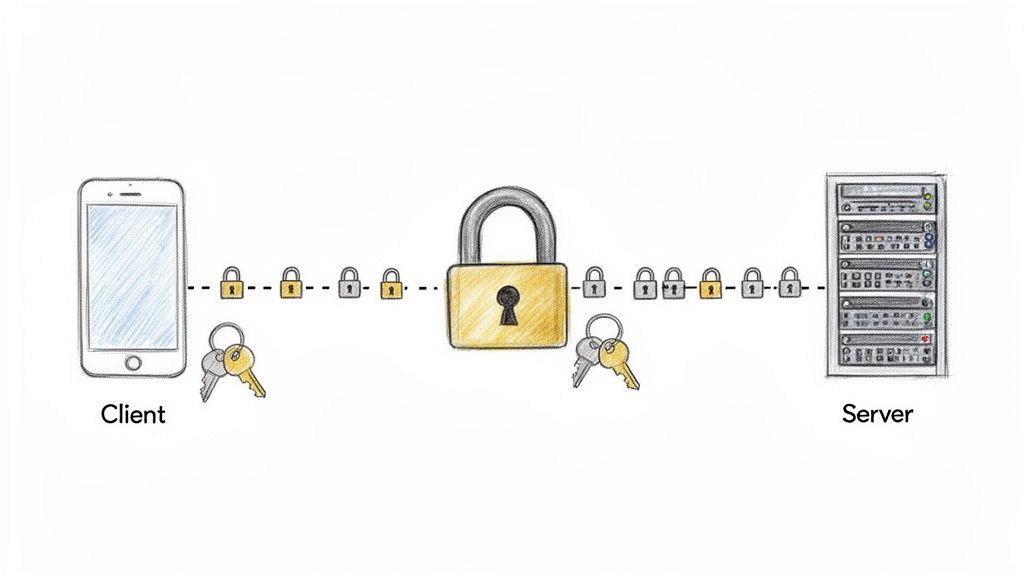
This practice is essential for apps handling sensitive information, such as financial details, personal health information (PHI), or private user communications. By making data interception useless, E2EE provides one of the strongest guarantees of privacy and data integrity, building foundational user trust.
Key Insight: E2EE shifts the trust model away from service providers and onto the cryptography itself. Even if your backend servers are compromised, the encrypted data remains secure as the server never possesses the decryption keys.
How to Implement E2EE Effectively
Implementing E2EE is a complex but vital task in our list of mobile app security best practices. Here’s how to approach it correctly:
- Use Proven Libraries: Avoid the temptation to create your own cryptographic algorithms. Instead, leverage well-vetted, open-source libraries like libsodium, Bouncy Castle, or Google's Tink. These libraries are maintained by security experts and are regularly updated to address new vulnerabilities.
- Secure Key Management: The entire system's security hinges on how you manage encryption keys. Store private keys securely on the device using platform-native solutions like the iOS Keychain and Android Keystore System. These hardware-backed secure enclaves protect keys from being extracted even on a compromised device.
- Upgrade Transport Layer Security: E2EE protects data content, but you still need to secure the communication channel itself. Enforce TLS 1.3 for all network requests to protect metadata and prevent protocol downgrade attacks.
- Integrate Early: Retrofitting E2EE into an existing application is significantly more difficult and error-prone than designing it into the architecture from the beginning. Plan your data flow and key exchange mechanisms during the initial design phase.
2. Secure API Authentication and Authorization (OAuth 2.0 / OpenID Connect)
Properly securing the communication between your mobile app and its backend API is fundamental to protecting user data. Using standardized frameworks like OAuth 2.0 and OpenID Connect establishes a robust, industry-accepted method for managing access. OAuth 2.0 handles delegated authorization (allowing the app to access resources on behalf of the user), while OpenID Connect builds on it to provide a crucial authentication layer that verifies the user's identity.
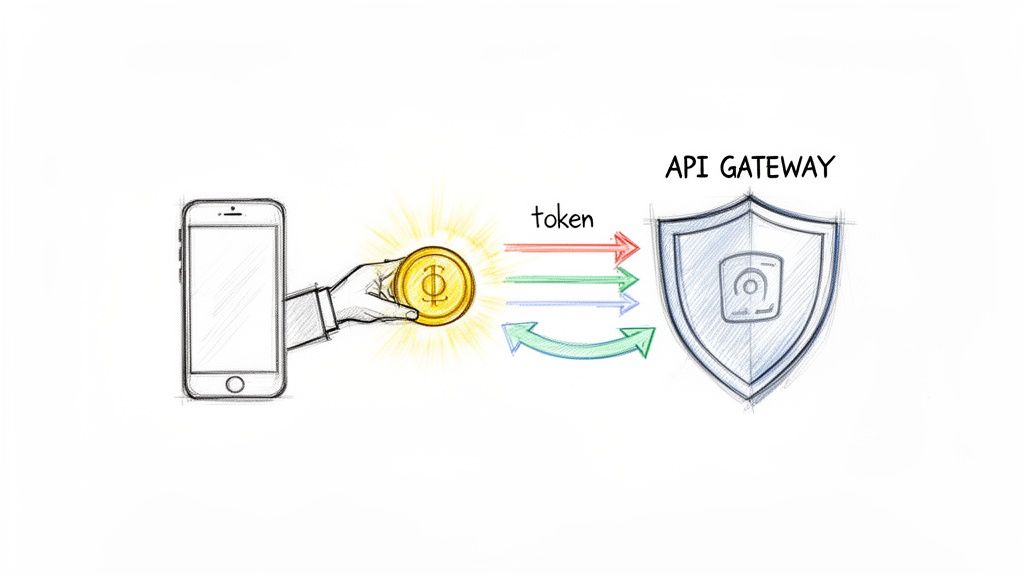
This approach prevents unauthorized API access by ensuring every request is properly authenticated and authorized. It's the standard behind familiar systems like "Sign in with Google" or "Login with Facebook," providing a secure and seamless user experience. By implementing these protocols, you avoid reinventing the wheel and benefit from a widely scrutinized security model.
Key Insight: The separation of authentication (who the user is) and authorization (what the user can do) allows for fine-grained access control. OAuth 2.0 and OpenID Connect provide a flexible yet secure foundation for managing user sessions and permissions without exposing credentials.
How to Implement OAuth 2.0 and OpenID Connect Effectively
Adopting these standards is a core mobile app security best practice for any application with a backend. Here’s how to do it right:
- Implement PKCE for Mobile: Always use the Proof Key for Code Exchange (PKCE) extension with the Authorization Code Grant. This is non-negotiable for public clients like mobile apps as it prevents authorization code interception attacks, even if a malicious app on the user's device hijacks the custom URI scheme.
- Use Short-Lived Access Tokens: Configure access tokens to have a short lifespan, typically between 15 and 60 minutes. Use long-lived refresh tokens to obtain new access tokens without requiring the user to log in again. This limits the window of opportunity for an attacker if an access token is compromised.
- Store Tokens Securely: Never store tokens in insecure locations like
SharedPreferences(Android) orUserDefaults(iOS). Use the platform's hardware-backed secure storage: the Android Keystore System and iOS Keychain. These systems encrypt the data and protect it from being extracted. - Enforce Server-Side Validation: Your API server must validate the token on every single request. This includes checking its signature, expiration date, and ensuring the scopes granted are sufficient for the requested operation. Effective API design best practices demand that authentication logic is built-in from the start, not retrofitted. For apps handling financial transactions, understanding platform-specific requirements like those for secure payment processing on iOS is also a critical part of API security.
3. Implement Certificate Pinning
Certificate pinning is an advanced security measure that prevents man-in-the-middle (MITM) attacks by enforcing a strict trust relationship between a mobile app and its backend servers. Instead of blindly trusting any certificate signed by a valid Certificate Authority (CA) in the device's trust store, the app is "pinned" to a specific server certificate or public key. The application will only establish a connection if the server's certificate matches the one embedded within the app itself.
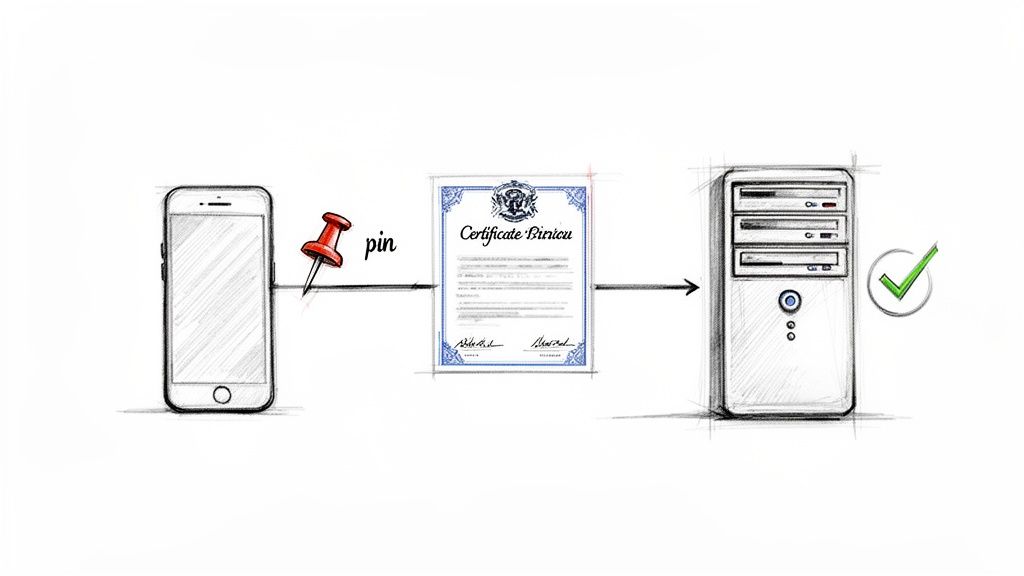
This practice is crucial for applications that handle highly sensitive data, such as banking, healthcare, or enterprise communications apps. By implementing certificate pinning, you effectively neutralize threats from compromised or rogue CAs, as any fraudulent certificate presented during an attack will be immediately rejected by the client application. This technique adds a powerful, client-side layer to your mobile app security best practices.
Key Insight: Standard TLS validation protects against many attacks, but it remains vulnerable to a compromised CA. Certificate pinning closes this gap by shifting the source of trust from a large, external set of CAs to a small, developer-controlled set of known certificates or keys.
How to Implement Certificate Pinning Effectively
Proper implementation is key to avoiding connectivity issues while maximizing security. Here’s a strategic approach to certificate pinning:
- Use Modern Platform Features: Leverage built-in, flexible solutions instead of hardcoding pins. For Android, use the Network Security Configuration file (network_security_config.xml) to define pins declaratively. For iOS, you can enforce pinning through App Transport Security (ATS) settings within your
Info.plist. - Pin the Public Key, Not the Certificate: Pinning the public key of the server's certificate is more flexible than pinning the entire certificate. This allows you to renew the certificate with the same key pair without needing to release a new app update.
- Always Have a Backup Pin: Certificate rotation is inevitable. To prevent your app from breaking, always include a pin for a backup certificate's public key. This allows you to seamlessly switch to the backup if your primary certificate is compromised or expires unexpectedly.
- Plan and Test Rotation Procedures: Don't wait for an emergency. Establish a clear certificate rotation strategy and rigorously test the entire process in a staging environment. Ensure your app correctly fails over to the backup pin and that your team is prepared to execute the plan.
4. Secure Local Data Storage with Platform-Specific Secure Enclaves
Securing data stored locally on a device is a fundamental pillar of mobile app security best practices. Simply saving sensitive information to a file is insufficient, as it leaves data vulnerable if the device is lost, stolen, or compromised by malware. This is where platform-specific secure enclaves and storage systems become essential, providing hardware-backed protection to encrypt and isolate critical data at rest.

These systems, such as the iOS Keychain and the Android Keystore System, are designed to manage cryptographic keys and small chunks of sensitive data like API tokens, passwords, and user credentials. They leverage a device's hardware security module, like Apple's Secure Enclave, to ensure that cryptographic operations and data access are isolated from the main operating system, offering a powerful defense against extraction attempts.
Key Insight: Using platform-native secure storage mechanisms offloads the heavy lifting of key management and encryption to the operating system. This not only improves security by using hardware-backed features but also simplifies development and reduces the risk of implementation errors.
How to Implement Secure Local Storage Effectively
Properly utilizing these platform tools is crucial for protecting user data. Here are actionable steps for robust implementation:
- Use the Right Tool for the Job: For iOS, store all credentials, tokens, and sensitive data strings in the Keychain. For Android, use the Android Keystore System to generate and store encryption keys, then use these keys with a library like EncryptedSharedPreferences to secure structured data.
- Avoid Unencrypted Plaintext Storage: Never store sensitive information directly in
UserDefaults(iOS) or standardSharedPreferences(Android). These are unencrypted by default and are easily readable on a rooted or jailbroken device. - Encrypt Local Databases: If your application requires a local database for storing larger volumes of sensitive data, such as in health or finance apps, implement a fully encrypted database solution like SQLCipher. It provides transparent, 256-bit AES encryption of database files.
- Clear Sensitive Data from Memory: After sensitive data is used, ensure it is promptly cleared from the application's memory. This prevents it from being captured through memory dump analysis on a compromised device.
5. Implement Code Obfuscation and Runtime Application Self-Protection (RASP)
Code obfuscation and Runtime Application Self-Protection (RASP) are advanced defensive layers that protect your mobile app from reverse engineering and active attacks. Obfuscation makes your compiled code difficult for humans to read and understand, deterring attackers from analyzing its logic. RASP goes a step further by integrating security directly into the app, allowing it to monitor its own behavior and react to threats in real-time.
These practices are crucial for apps that contain proprietary algorithms, handle sensitive transactions, or operate in high-risk environments like finance and gaming. By making your app a much harder target, you can prevent intellectual property theft, discovery of vulnerabilities, and unauthorized modifications that lead to piracy or cheating.
Key Insight: While many security measures protect data in transit or at rest, obfuscation and RASP are designed to protect the application itself. They create a hostile environment for attackers trying to deconstruct or manipulate your app on a user's device.
How to Implement Obfuscation and RASP Effectively
Combining these two techniques is a powerful part of a comprehensive mobile app security best practices strategy. Here is how to implement them correctly:
- Enable Built-in Obfuscation: For Android, enable and configure R8 (the successor to ProGuard) in your release builds. It provides robust code shrinking, optimization, and obfuscation. For iOS, while Swift and Objective-C are compiled to machine code, you can still obfuscate strings and control flow using third-party tools.
- Integrate RASP Solutions: Implement libraries that provide runtime protection. This includes jailbreak and root detection to ensure the app is running in a secure environment. RASP can also detect and block common attacks like method hooking, debugger attachment, and screen recording.
- Balance Security with User Experience: Overly aggressive RASP can sometimes flag legitimate user actions as threats, leading to a poor experience or app crashes. Implement graceful degradation where possible; instead of crashing, warn the user or disable high-risk features if a threat is detected.
- Test Obfuscated Builds Thoroughly: Obfuscation can sometimes introduce bugs or interfere with reflection-based code. Always conduct extensive QA testing on the final, obfuscated release build to ensure all functionality works as expected and to avoid false positives from your RASP implementation.
6. Enforce Strong Input Validation and Output Encoding
Properly handling user-supplied data is a cornerstone of mobile app security. Input validation is the process of rigorously checking all data received by the app from any source, including users, APIs, or device sensors, to ensure it meets expected formats, types, and constraints. Conversely, output encoding involves sanitizing data before it is displayed, preventing browsers or other interpreters from executing malicious code embedded within the data.
This dual approach acts as a primary defense against a wide array of injection attacks. By treating all incoming data as untrusted and all outgoing data as potentially unsafe, you can effectively block common vulnerabilities like Cross-Site Scripting (XSS), SQL injection, and command injection that rely on manipulating app behavior through malicious input. This is an essential practice for apps that handle form submissions, API responses, or user-generated content.
Key Insight: Never trust the client. Client-side validation is excellent for providing a smooth user experience but offers no real security. A determined attacker can easily bypass it, making robust server-side validation a non-negotiable security control.
How to Implement Strong Validation and Encoding
Integrating these safeguards is a fundamental step in our list of mobile app security best practices. Here is a practical guide to implementing them:
- Adopt a Whitelisting Approach: Instead of trying to block known bad inputs (blacklisting), define strict rules for what is considered valid data (whitelisting) and reject everything else. For example, a username field might only allow alphanumeric characters and underscores within a specific length.
- Use Parameterized Queries: To prevent SQL injection, never construct database queries by concatenating strings with user input. Use prepared statements or parameterized queries, which treat user input as data, not as executable code, regardless of its content.
- Validate on Both Ends: Implement validation on the client-side to give immediate feedback to users and on the server-side as your authoritative security check. The server must re-validate everything it receives from the client.
- Leverage Framework Utilities: Use platform-native tools to simplify implementation. iOS's Foundation framework and Android's built-in validation utilities provide robust methods for URL and string encoding, helping neutralize potentially harmful characters before they are rendered.
7. Implement Secure Dependency Management and Regular Security Patching
Secure dependency management is the practice of vetting, tracking, and regularly updating all third-party libraries, frameworks, and Software Development Kits (SDKs) used within your mobile application. Modern apps are rarely built from scratch; they stand on the shoulders of countless open-source and commercial dependencies. This creates a significant attack surface known as the software supply chain, where a single vulnerability in a popular library can compromise thousands of downstream applications.
This practice is a cornerstone of modern mobile app security best practices because it directly addresses the risk of inherited vulnerabilities. High-profile incidents like the Log4j vulnerability (CVE-2021-44228) demonstrated how a flaw in one ubiquitous library could trigger a global security crisis. Proactive patching and management prevent your app from becoming a victim of such widespread exploits.
Key Insight: Your app's security is only as strong as its weakest dependency. Failing to manage your software supply chain means you are implicitly trusting the security practices of dozens of external development teams without verification.
How to Implement Secure Dependency Management Effectively
Integrating robust dependency management into your development lifecycle is non-negotiable for building secure and resilient applications. Here’s a practical approach:
- Use Software Composition Analysis (SCA) Tools: Automate the discovery of vulnerabilities within your project's dependencies. Integrate tools like Snyk, Dependabot (native to GitHub), or WhiteSource directly into your CI/CD pipeline to scan for known issues on every build.
- Establish a Patching Policy: Define clear service-level agreements (SLAs) for addressing vulnerabilities based on their severity. For example, critical vulnerabilities must be patched within 72 hours, while low-severity issues can be addressed in the next sprint.
- Pin Dependency Versions: Always specify exact versions for your dependencies in your
build.gradle,Podfile, orPackage.swiftfiles. This prevents unexpected or malicious updates from being pulled into your build and ensures that your production environment is reproducible and stable. - Vet and Prune Dependencies: Before adding a new library, evaluate its maintenance history, community support, and security track record. Regularly audit your project and remove any unused or abandoned dependencies to minimize your app's potential attack surface.
8. Enable Comprehensive Logging, Monitoring, and Threat Detection
Comprehensive logging captures a detailed, time-stamped record of security-relevant events within your mobile app and its backend systems. This data feeds into monitoring and threat detection systems that actively identify anomalies, potential intrusions, and suspicious user behavior in real-time. This proactive visibility is fundamental for rapid incident response, forensic analysis after a security breach, and maintaining a clear view of your app's security posture.
This practice is essential for any application, but it becomes non-negotiable for those handling sensitive data. For instance, banking apps rely on it to detect fraud by logging all transactions and access attempts, while healthcare apps must audit every access to protected health information (PHI) to meet compliance mandates. Effective logging and monitoring turn your system from a black box into a transparent environment where threats can be spotted and neutralized quickly.
Key Insight: Without comprehensive logs, you are effectively blind to security events. When an incident occurs, you will have no evidence to understand the attacker's methods, assess the damage, or prevent it from happening again.
How to Implement Logging and Monitoring Effectively
Implementing a robust logging and monitoring strategy is a cornerstone of modern mobile app security best practices. It transforms security from a passive state to an active, ongoing process.
- Log Security-Relevant Events: Focus on what matters. Your logs must capture all authentication successes and failures, authorization decisions, changes to permissions, sensitive data operations, and critical errors. Do not log sensitive data like passwords, full credit card numbers, or PII; instead, log safe, non-identifiable references.
- Centralize and Structure Logs: Never store sensitive logs solely on the client device, where they can be tampered with or lost. Stream logs to a centralized, secure server-side system like the ELK Stack (Elasticsearch, Logstash, Kibana) or Splunk. Use a structured format like JSON for all log entries to make them easily searchable and analyzable.
- Implement Real-Time Alerting: Passive log collection is not enough. Configure your monitoring system to trigger real-time alerts for specific threat indicators, such as multiple failed login attempts from one IP (brute-force attack), impossible geographic access patterns, or unusually high data access rates. This enables your security team to respond immediately. Learn more about effective strategies with these application monitoring best practices.
- Establish Retention Policies: Define clear log rotation and data retention policies that align with legal and compliance requirements, such as GDPR or HIPAA. Securely archive old logs for forensic purposes but ensure they are purged after the mandated period to minimize data exposure.
9. Implement Rate Limiting and DDoS Protection
Rate limiting is a defensive mechanism that restricts the number of requests a user or IP address can make to your server within a specific time frame. This control is vital for preventing automated abuse, such as credential stuffing, brute-force login attempts, and content scraping. By capping request frequency, you protect your backend resources from being overwhelmed, ensuring the application remains stable and responsive for legitimate users.
Complementing this is Distributed Denial of Service (DDoS) protection, a broader set of techniques designed to mitigate large-scale, coordinated attacks. While rate limiting handles individual abusers, DDoS protection absorbs and filters malicious traffic from thousands of distributed sources, a critical defense for maintaining service availability. Integrating these measures is a fundamental part of our mobile app security best practices.
Key Insight: Rate limiting and DDoS protection are not just about security; they are about availability. An app that is offline due to a resource exhaustion attack is just as useless to a user as an app that has been breached.
How to Implement Rate Limiting and DDoS Protection Effectively
Properly configuring these controls ensures your app can withstand both simple abuse and sophisticated attacks. Here’s a practical approach:
- Implement Server-Side Controls: Never rely on the mobile client to enforce limits. All rate-limiting logic must reside on the server or at the API gateway level. Client-side checks are easily bypassed by determined attackers.
- Leverage API Gateways: Use solutions like AWS API Gateway, Kong, or Apigee to manage rate limiting centrally. These tools provide sophisticated controls to set usage plans and throttling rules per API key, user tier, or IP address.
- Provide Clear Client Feedback: When a user is rate-limited, your API should return a
429 Too Many RequestsHTTP status code. Crucially, include aRetry-Afterheader to inform the client app how long it should wait before making another request, enabling a graceful user experience. - Deploy a DDoS Mitigation Service: For critical applications, use a specialized service like Cloudflare or AWS Shield. These services act as a frontline defense, filtering malicious traffic before it ever reaches your application infrastructure, providing protection against volumetric and protocol-level attacks.
10. Conduct Regular Security Testing, Penetration Testing, and Privacy by Design
A proactive security posture requires more than just secure coding; it demands continuous validation. Regular security testing, including penetration testing and a "Privacy by Design" approach, shifts security from a reactive afterthought to a foundational component of the development lifecycle. This comprehensive strategy involves systematically identifying vulnerabilities through automated scans and simulated real-world attacks, ensuring the app is resilient against threats before they can be exploited in production.
This triad of practices is a cornerstone of modern mobile app security best practices. It combines automated code analysis (SAST), dynamic environment scanning (DAST), and expert-led manual attacks (penetration testing) to uncover a wide spectrum of weaknesses. Layering "Privacy by Design" on top ensures that user data protection is considered from the very first wireframe, not just bolted on to meet compliance requirements.
Key Insight: Security testing isn't just about finding bugs; it's about validating your security controls. A clean penetration test report is tangible proof that your defense mechanisms work as intended under pressure from a skilled adversary.
How to Implement a Comprehensive Testing and Privacy Strategy
Integrating these practices creates a robust feedback loop that continuously hardens your application. Here’s how to effectively implement this multifaceted approach:
- Automate Early and Often: Integrate Static Application Security Testing (SAST) tools like SonarQube or Checkmarx directly into your CI/CD pipeline. This provides developers with immediate feedback on security flaws in their code before it even gets merged, making vulnerabilities cheaper and faster to fix.
- Simulate Attacks on Staging: Regularly run Dynamic Application Security Testing (DAST) tools such as Burp Suite or OWASP ZAP against your staging environments. This helps identify runtime vulnerabilities that are not visible in the source code, like server misconfigurations or authentication flaws.
- Hire Ethical Hackers: Schedule manual penetration tests with reputable third-party security firms at least annually, or more frequently for high-risk applications like those in finance or healthcare. These experts use the same techniques as malicious attackers to find complex, business-logic vulnerabilities that automated tools often miss. You can find more details in this comprehensive mobile app testing checklist.
- Embed Privacy from Day One: Adopt a "Privacy by Design" methodology. Before writing a single line of code, conduct a privacy impact assessment to map all personal data flows. Practice data minimization by collecting only what is absolutely necessary and anonymize analytics data wherever possible to reduce your app's risk profile.
Mobile App Security: 10 Best Practices Comparison
| Security Measure | Implementation Complexity 🔄 | Resources & Expertise ⚡ | Expected Outcomes ⭐ / Impact 📊 | Ideal Use Cases 📊 | Key Advantage ⭐ / Quick Tip 💡 |
|---|---|---|---|---|---|
| Implement End-to-End Encryption (E2EE) | High — complex cryptography & key management 🔄 | High — crypto expertise, secure key storage, CPU overhead ⚡ | ⭐⭐⭐⭐⭐ — Strong privacy; prevents MITM; regulatory alignment 📊 | Messaging, banking, healthcare, sensitive PII apps 📊 | ⭐ Endpoint-only decryption. Tip: use established libs, TLS ≥1.2, secure keystore & key rotation 💡 |
| Secure API Authentication & Authorization (OAuth2 / OIDC) | Medium–High — multiple flows and token lifecycle 🔄 | Medium — backend token management, PKCE, SSO tooling ⚡ | ⭐⭐⭐⭐ — Robust auth, reduces password exposure, fine-grained scopes 📊 | Apps requiring user login, SSO, social login, third‑party APIs 📊 | ⭐ Industry standard with wide tooling. Tip: implement PKCE, short access tokens, secure token storage 💡 |
| Implement Certificate Pinning | Medium — careful pin/rotation strategy required 🔄 | Medium — certificate lifecycle management, backup pins ⚡ | ⭐⭐⭐⭐ — Prevents rogue-CA MITM attacks; increases connection trust 📊 | Financial, enterprise, high-risk backends, critical API endpoints 📊 | ⭐ Protects against compromised CAs. Tip: maintain backup pins, test rotations in staging 💡 |
| Secure Local Data Storage (Secure Enclaves) | Medium — platform-specific APIs & fallbacks 🔄 | Low–Medium — use platform keystore/keychain, hardware support ⚡ | ⭐⭐⭐⭐ — Strong at-rest protection; biometric integration; reduces stolen-data risk 📊 | Storing credentials, tokens, payment and health data on-device 📊 | ⭐ Hardware-backed encryption. Tip: avoid SharedPreferences/UserDefaults for secrets; use Keystore/Keychain 💡 |
| Code Obfuscation & RASP | Medium — build pipeline changes and runtime checks 🔄 | Medium — obfuscation tools, RASP agents, testing resources ⚡ | ⭐⭐⭐ — Raises reverse-engineering bar; runtime detection of tampering 📊 | IP-sensitive apps (gaming, fintech), apps at risk of tampering or piracy 📊 | ⭐ Defense-in-depth for IP. Tip: include obfuscation in CI, balance RASP strictness to avoid false positives 💡 |
| Input Validation & Output Encoding | Low–Medium — systematic across codebase 🔄 | Low — developer time and standard libraries ⚡ | ⭐⭐⭐⭐ — Prevents injection classes of vulnerabilities; improves stability 📊 | All apps (forms, APIs, file uploads); especially data-driven apps 📊 | ⭐ High payoff, low cost. Tip: whitelist inputs, validate client+server, use parameterized queries 💡 |
| Secure Dependency Management & Patching | Medium — process & CI integration 🔄 | Medium — SCA tools, staging testing, governance ⚡ | ⭐⭐⭐⭐ — Reduces supply-chain and known-vuln risk; faster remediation 📊 | Long-lived apps, enterprise & third‑party library heavy projects 📊 | ⭐ Early detection of vulnerable libs. Tip: integrate SCA in CI, pin versions, automate updates & testing 💡 |
| Comprehensive Logging, Monitoring & Threat Detection | Medium–High — infrastructure & analyst effort 🔄 | High — log storage, SIEM/ML tooling, SOC expertise ⚡ | ⭐⭐⭐⭐ — Real-time detection, forensics, compliance evidence 📊 | Regulated apps, enterprise, fraud‑sensitive services, incident‑response needs 📊 | ⭐ Enables fast detection & investigations. Tip: centralize logs, avoid logging PII, set retention policies 💡 |
| Rate Limiting & DDoS Protection | Low–Medium — server-side policies and infra 🔄 | Medium — API gateway, CDN/DDoS services for scale ⚡ | ⭐⭐⭐⭐ — Maintains availability; prevents brute‑force & abuse 📊 | Public APIs, high‑traffic services, payment endpoints, login APIs 📊 | ⭐ Preserves uptime under attack. Tip: enforce server-side limits, return 429 + Retry-After, use CDNs/WAFs for DDoS 💡 |
| Security Testing, Penetration Testing & Privacy by Design | High — continuous program and cross-team work 🔄 | High — SAST/DAST/IAST tools, pentesters, privacy experts ⚡ | ⭐⭐⭐⭐⭐ — Comprehensive vulnerability discovery; compliance & privacy risk reduction 📊 | Regulated industries, mission‑critical apps, pre‑launch audits, GDPR/HIPAA contexts 📊 | ⭐ Finds issues before production. Tip: integrate SAST/DAST into CI, run annual pentests, do threat modeling & data minimization early 💡 |
From Checklist to Culture: Building a Security-First Mindset
Navigating the landscape of mobile app security can feel like a daunting task, akin to defending a fortress against an ever-evolving siege. Throughout this guide, we've dissected ten critical pillars of a robust defense, from implementing end-to-end encryption and securing APIs with OAuth 2.0 to leveraging platform-specific secure enclaves and the proactive power of Runtime Application Self-Protection (RASP). We have established that a secure application is not a happy accident; it is the direct result of deliberate, strategic, and continuous effort.
The central message is clear: security is not a feature to be added, but a foundation upon which all features are built. A checklist of mobile app security best practices is an essential starting point, but its true power is only unlocked when it evolves into an ingrained, organization-wide culture. It's the difference between a team that asks "Is it secure?" at the end of a project and a team that asks "How will we build this securely?" from the very first brainstorming session.
The Most Important Takeaways
As you move from reading to implementation, concentrate on these core principles that underpin all the practices we've discussed:
- Proactivity Over Reactivity: The most effective security measures are preventative. Implementing code obfuscation, certificate pinning, and strong input validation are proactive steps that harden your app against attacks before they happen. Waiting for a breach to occur is a costly, brand-damaging strategy.
- Defense in Depth: There is no single silver bullet. A layered security model is paramount. Combining secure data storage, encrypted data transmission, and rigorous authentication ensures that even if one layer is compromised, others stand firm to protect user data and your infrastructure.
- Security is a Lifecycle Concern: Integrating security into every phase of the Software Development Life Cycle (SDLC) is non-negotiable. This means security reviews during the design phase, automated security scanning in your CI/CD pipeline, regular penetration testing before release, and continuous monitoring post-launch.
Actionable Next Steps: Embedding Security into Your DNA
Transforming a checklist into a culture requires tangible actions. Here is a practical roadmap for product managers, CTOs, and development teams to begin this transformation:
- Conduct a Gap Analysis: Start by auditing your current applications and development processes against the ten best practices outlined in this article. Identify the most critical vulnerabilities and prioritize them based on potential impact and effort to remediate.
- Automate Security in Your Pipeline: Integrate Static Application Security Testing (SAST) and Dynamic Application Security Testing (DAST) tools directly into your CI/CD workflow. This provides developers with immediate feedback and prevents vulnerable code from ever reaching production.
- Invest in Team Education: Security is everyone's responsibility. Organize regular training sessions on secure coding practices, common vulnerabilities (like the OWASP Mobile Top 10), and the specific security tools your organization uses. To cultivate a robust security-first culture, it is beneficial to consult comprehensive guides that outline actionable strategies, such as these 10 Mobile App Security Best Practices for React Native, which can provide framework-specific insights for your team.
- Establish a Security Champion Program: Designate security-minded individuals within each development team to act as champions. They can advocate for best practices, answer questions, and serve as a bridge between the development teams and a dedicated security team.
Ultimately, mastering these mobile app security best practices is about more than just risk mitigation; it's about building and maintaining trust. In a crowded digital marketplace, user trust is your most valuable currency. A secure and reliable application becomes a key differentiator, fostering user loyalty, protecting your brand's reputation, and ultimately enabling sustainable business growth. Embrace security not as a burdensome requirement, but as a strategic enabler of success. The journey from a simple checklist to a deeply embedded security culture is a commitment, but it's one that pays invaluable dividends in resilience and user confidence.