What is rest api? A Clear Guide to Understanding RESTful APIs
At its core, a REST API is just a set of rules that software applications follow to talk to each other over the internet. It's not a specific technology or language but an architectural style—a specific way of designing networked applications.
Think of it as a universal translator that lets different systems, even those built on completely different tech stacks, request and exchange information using standard web protocols.
Breaking Down How a REST API Works
So, how does this "conversation" between two systems actually happen? Let's ditch the jargon for a moment and use an analogy everyone gets: ordering food at a restaurant. This simple scenario maps perfectly to the technical components of an API call, making a complex topic much easier to swallow.
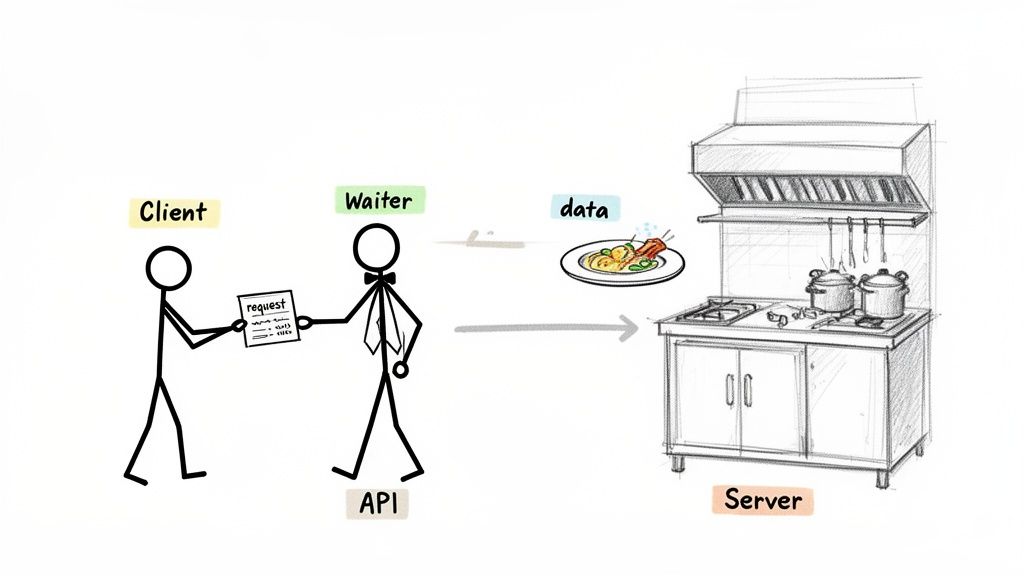
The Key Players in an API Call
When you sit down at a restaurant, you are the Client. You have a need—in this case, for food—but you don't just walk into the kitchen and start cooking. That would be chaos.
Instead, you interact with a waiter, who is the API (Application Programming Interface). The waiter is the intermediary. They take your specific request (based on the menu), translate it for the kitchen, and ensure your order is handled correctly. The waiter provides a clean, predictable interface so you never have to worry about the kitchen's messy, complex operations.
The kitchen, of course, is the Server. It holds all the ingredients (data) and has the internal logic to prepare what you requested. Once your dish (the Resource) is ready, the waiter brings it back to you. This whole process is predictable, efficient, and follows a clear set of rules—the very essence of a RESTful system.
At its heart, REST provides a structured, predictable way for a client to ask a server for a specific resource. The API is simply the messenger that manages this request and delivers the response, making sure both sides speak the same language.
This separation between the client and server is a huge deal. It means the client (like a mobile app) and the server (the backend systems and databases) can be developed and updated completely independently. As long as the "menu," or API contract, stays the same, the kitchen can get all new ovens and the customer experience won't change one bit.
Key Players in a REST API Interaction
This table breaks down the fundamental components of any REST API communication, clarifying their roles and responsibilities.
| Component | Role in the Restaurant Analogy | Technical Function |
|---|---|---|
| Client | You, the customer ordering food. | The application (e.g., a mobile app or web browser) that initiates a request for data. |
| API | The waiter who takes your order. | The interface that receives requests, translates them for the server, and returns a response. |
| Server | The kitchen that prepares the food. | The system that stores the data, processes the request, and provides the requested resource. |
| Resource | The dish you ordered. | The specific piece of data or information the client wants (e.g., a user profile, a product list). |
Once you nail down this simple client-server structure, you've taken the first big step toward understanding how REST APIs power almost every digital service you use daily, from checking the weather on your phone to updating your social media feed.
The Six Rules That Define REST Architecture
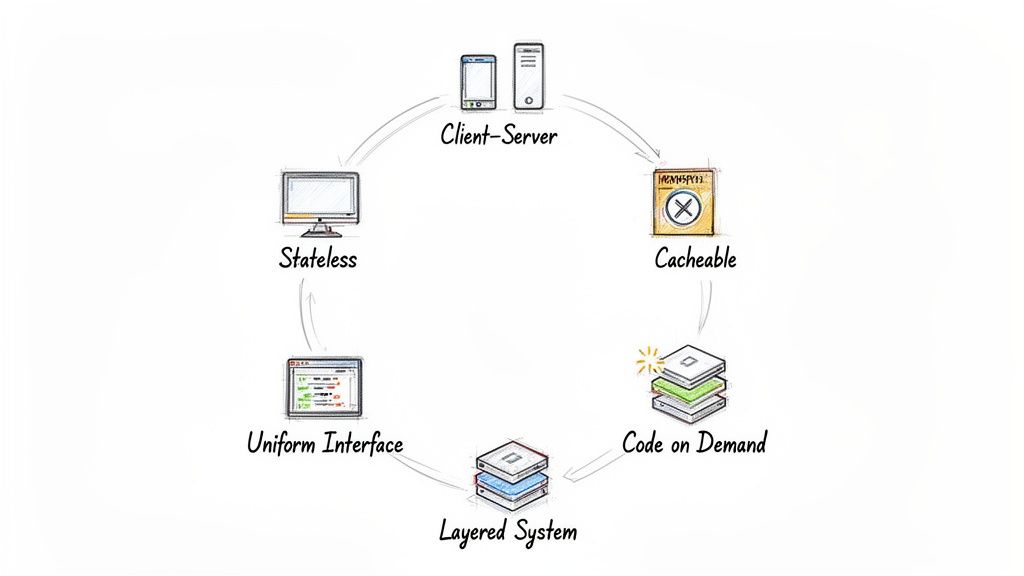
So, what actually makes an API "RESTful"? It’s not just a loose term; it’s a commitment to a specific set of architectural constraints. Think of these as the ground rules for building web services that are reliable, scalable, and won't give you a headache to maintain down the road.
These six principles are the secret sauce behind REST's success. They work together to create a predictable and efficient way for applications to talk to each other. Let's break them down one by one.
Client-Server Separation
First and foremost, REST demands a clean break between the client and the server. The client handles the user interface and experience—what the user sees and interacts with. The server, on the other hand, is all about the backend: data storage, business logic, and security.
This separation is a game-changer. It means your mobile app (the client) and your database infrastructure (the server) can evolve on completely separate tracks. As long as the API contract doesn't change, you can rebuild the entire server without the client even noticing, and vice-versa.
Statelessness
This one is crucial. Statelessness means every single request sent from a client to the server must be a self-contained package. It has to include all the information the server needs to understand and process it, because the server forgets about the client the moment the request is over.
It’s like using a vending machine. The machine doesn’t remember that you bought a soda a minute ago. Each time you want something, you have to put your money in and make your selection. Every transaction is a fresh start.
This stateless design is a primary reason for REST's incredible scalability. Since no session data is stored, any server in a cluster can handle any client request, which makes load balancing and improving reliability a breeze.
Cacheability
Nobody likes waiting. To boost performance, REST APIs must make it clear whether a response can be cached. If a response is marked as cacheable, the client can store and reuse that data for a while instead of bugging the server for it again.
This simple rule drastically cuts down on server load and makes apps feel snappy and responsive to the user. For instance, a list of product categories that rarely changes is a perfect candidate for caching, saving countless network trips and processing cycles.
Uniform Interface
The uniform interface is the heart of REST's simplicity. It dictates that there should be one consistent, predictable way to interact with the server, no matter what kind of application or device is making the request. This is achieved through four key ideas:
- Resource Identification: Every piece of information is a "resource," and each one gets a unique, stable address called a URI (e.g.,
/users/123). - Resource Manipulation Through Representations: You never touch the resource directly. Instead, you work with a representation of it, like a JSON object. This representation gives you everything you need to modify or delete the actual data on the server.
- Self-Descriptive Messages: Every message must carry enough context for the other side to understand it. For example, an HTTP header like
Content-Type: application/jsontells the receiver exactly how to parse the message body. - Hypermedia as the Engine of Application State (HATEOAS): This is a fancy way of saying that a server’s response should include links that guide the client on what to do next. It allows an application to navigate the API by following links, much like a person browsing a website.
Layered System
The layered system rule means a client shouldn't know or care if it's talking directly to the server or to an intermediary. You can place layers—like load balancers, security gateways, or caching proxies—between the client and the final server without breaking anything.
This architecture is great for scalability, as it allows for load balancing across multiple servers. It also bolsters security by enabling components like web application firewalls. This is just one of many powerful ideas found in different types of software architecture design patterns used to build robust systems.
Code on Demand (Optional)
Last but not least is Code on Demand, the only optional constraint in the REST playbook. This principle allows a server to send executable code (like JavaScript) to a client, temporarily extending its functionality. While it’s a powerful concept, it’s not something you see used very often in modern REST APIs.
Understanding the Language of REST APIs
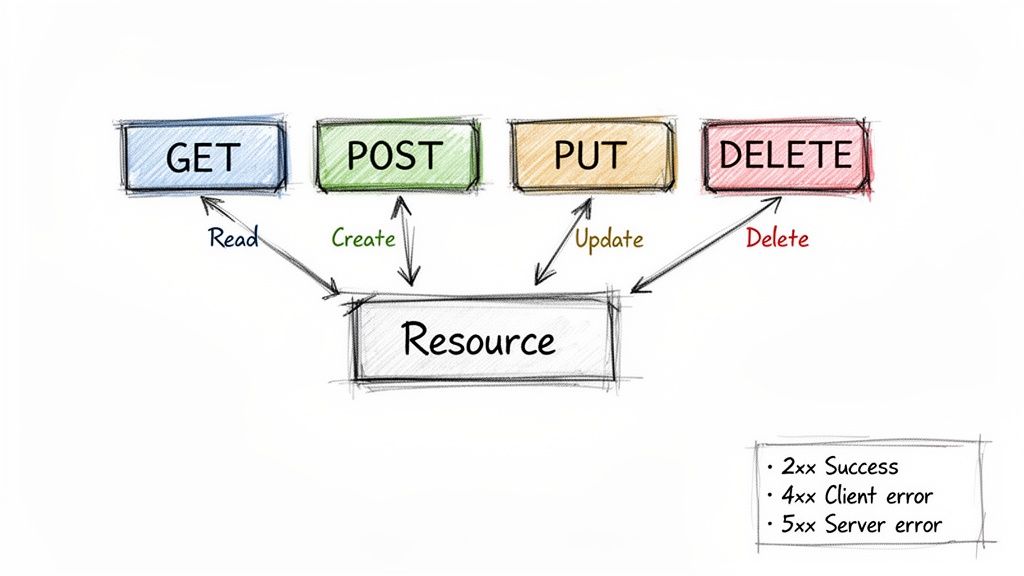
Every productive conversation needs a shared language. For REST APIs, that conversation happens using HTTP, the very protocol that runs the web. Instead of inventing a whole new set of commands, developers just use the standard HTTP methods you’re already familiar with as "verbs" to tell the server what to do.
This is one of the most brilliant parts of REST's design. It makes interacting with an API feel intuitive because it builds on a universal language. Developers don't have to study a proprietary manual for every new service; they already know the core vocabulary. This universal adoption is why a staggering 93% of organizations still rely on REST as their primary API architecture.
The Four Main Verbs of an API
At its heart, any interaction with data comes down to four basic operations, often remembered by the acronym CRUD: Create, Read, Update, and Delete. REST beautifully maps each of these actions to a specific HTTP method, creating a clear and consistent pattern.
- GET: This is your "read" command. It's used to fetch or retrieve a resource. When you type a URL into your browser and hit Enter, you're making a GET request. Simple as that.
- POST: This is how you create something new. Think about submitting a sign-up form or publishing a new blog post. You're sending a bundle of new information to the server.
- PUT: This method is for updating an existing resource. It's typically used to replace the entire resource with new data, like if you wanted to overwrite a user's entire profile at once.
- DELETE: It does exactly what it says on the tin. This is the command you send to permanently delete a resource.
This clear mapping takes the guesswork out of API design. The HTTP verb immediately tells you the intent of the request.
By standardizing actions around GET, POST, PUT, and DELETE, REST APIs ensure that client-server communication is both predictable and easy to debug. The verb tells you the 'what,' and the resource URL tells you the 'where.'
Mapping HTTP Methods to Common Actions
To really nail this down, let's look at how these methods translate into the everyday tasks you'd perform with an application's data. This table makes the connection crystal clear.
| HTTP Method | CRUD Operation | Example Use Case |
|---|---|---|
| GET | Read | Fetching the profile of user 123 with /users/123. |
| POST | Create | Adding a new product to the catalog via /products. |
| PUT | Update/Replace | Replacing all information for order 456 at /orders/456. |
| DELETE | Delete | Removing blog post 789 using the endpoint /posts/789. |
See the pattern? The action you want to take directly corresponds to the HTTP method you use. It's an elegant system that works the same way across countless APIs.
The Server's Reply: HTTP Status Codes
A conversation isn't a monologue. After the client sends a request, the server always replies with an HTTP status code. These three-digit codes are the server's way of saying, "Got it. Here's what happened."
They provide instant feedback that's crucial for developers and automated systems alike. Fortunately, they're grouped into logical categories, which makes them easy to interpret.
- 2xx Success: Codes in this range mean everything worked perfectly. The most famous is 200 OK, but you'll also see 201 Created after you successfully POST new data.
- 4xx Client Error: This means the request failed because of something the client did wrong. A 404 Not Found means you asked for something that isn't there, while a 401 Unauthorized means you forgot to log in.
- 5xx Server Error: When you see one of these, it's the server's fault. A 500 Internal Server Error is the classic "oops, something broke on our end" message.
Getting comfortable with this language of methods and status codes is the key to working effectively with any REST API. It turns what could be a complex technical chore into a straightforward dialogue between two systems.
Seeing a REST API Work in a Real Scenario
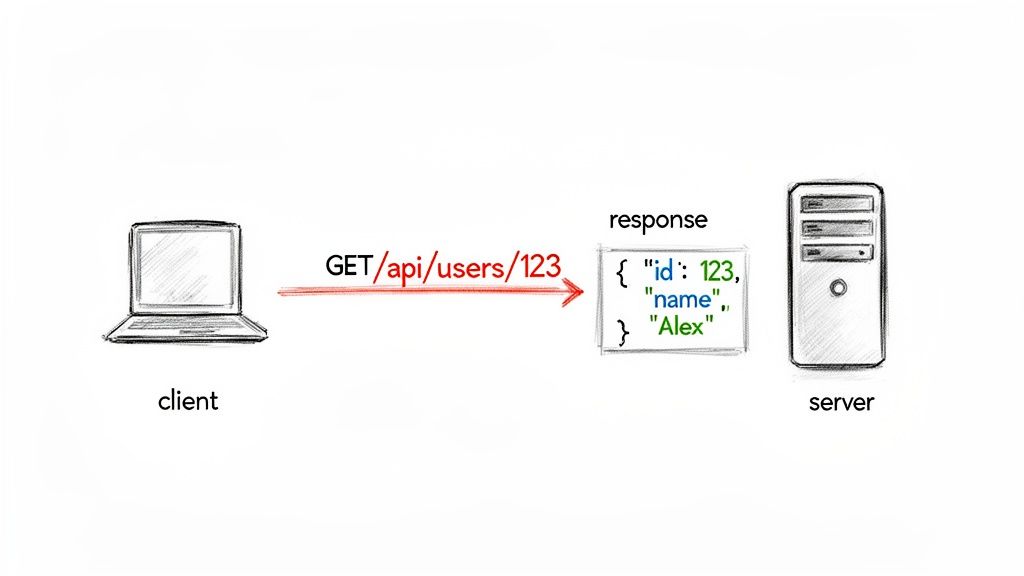
Theory is great, but seeing a REST API in action is where it all really clicks. Let's walk through a simple, everyday request-and-response cycle to make these concepts feel less abstract.
Imagine you're building an app that pulls in a user's profile from a social media platform. Your app (the client) needs to ask the platform’s server for that information. It does this by sending a carefully crafted HTTP request—a precise instruction the server is built to understand.
This request is a combination of an HTTP method (the verb) and a URL (the specific address, or endpoint) that points directly to the resource you want.
Fetching a User Profile with a GET Request
To simply retrieve data, the go-to method is GET. Let's say we want the profile for user ID 42. The request is beautifully simple and descriptive: GET /api/v1/users/42.
The client fires this off to the server. The server then finds user 42 in its database, bundles their info into a standard format, and sends it back. That format is almost always JSON (JavaScript Object Notation), chosen for being lightweight and dead simple for both humans and machines to read.
Here’s a breakdown of the entire conversation:
The Request:
GET /api/v1/users/42 HTTP/1.1
Host: social.example.com
Authorization: Bearer
GET /api/v1/users/42: This is the core instruction—the verb (GET) and the endpoint.Host: Tells the server which domain is being addressed.Authorization: A header carrying a token to prove we have permission to see this data.
The Response:
The server replies with a status code, like 200 OK for success, and a JSON body.
{
"id": 42,
"username": "jane_doe",
"displayName": "Jane Doe",
"joinDate": "2023-10-26T10:00:00Z",
"isActive": true
}
And there it is. A clean, structured representation of the user resource. Your application can now easily parse this JSON and display Jane's profile information.
Creating a New Post with a POST Request
Now, what if Jane wants to create something new, like a status update? This action requires sending data to the server, so we switch to the POST method.
This time, the request targets a "collection" endpoint, like /api/v1/posts, and the new post's content is tucked into the request body.
The Request:
POST /api/v1/posts HTTP/1.1
Host: social.example.com
Authorization: Bearer
Content-Type: application/json
{
"authorId": 42,
"content": "Just learned about REST APIs! #devlife"
}
See that Content-Type header? It's a crucial piece of information that tells the server, "Hey, I'm sending you JSON."
A REST API provides a predictable contract for interaction. The client knows exactly how to structure a request to get a specific outcome, and the server provides a response in a consistent, machine-readable format.
The Response:
If everything goes smoothly, the server responds with a 201 Created status code. It will also typically send back the newly created resource, now with its own server-assigned ID. For a great real-world example of how major regulations can drive API development, look into PSD2 Integration, which has fundamentally changed banking through secure APIs.
{
"id": 987,
"authorId": 42,
"content": "Just learned about REST APIs! #devlife",
"timestamp": "2024-05-15T14:30:00Z"
}
This back-and-forth communication is the fundamental rhythm of the modern web, allowing countless different systems to talk to each other seamlessly.
How REST Stacks Up Against Other API Styles
While REST is easily the most common way to build APIs today, it's definitely not the only game in town. To really get a handle on why REST works the way it does, it's helpful to see it alongside its main alternatives: the heavyweight veteran, SOAP, and the flexible newcomer, GraphQL. Each one takes a totally different swing at the same core problem: how to get different applications talking to each other.
Picking the right API style is a huge architectural decision, one that ripples out to affect everything from developer productivity to performance and how easily your system can grow. It’s not about finding the single "best" API style, but about finding the best fit for what you're trying to build. The API management market, which is almost entirely built around REST APIs, is a great indicator of REST's importance. It was valued at USD 8.86 billion and is expected to hit USD 19.28 billion by 2030, which shows just how deeply it's embedded in modern systems. If you're interested in the numbers, you can read the full market analysis from Technavio to see the trend.
SOAP: The Structured Predecessor
Before REST took over, SOAP (Simple Object Access Protocol) was the standard, especially for big, enterprise-level web services. The key difference is that REST is a set of guidelines, while SOAP is a rigid, formal protocol with a very strict set of rules.
- Strict Contracts: SOAP uses XML for its messages and depends on a formal contract file called a WSDL (Web Services Description Language). This file spells out every single function, data type, and structure down to the last detail. It's incredibly predictable, but also notoriously wordy and complex to work with.
- Built-in Security: It comes with comprehensive, built-in standards for security and compliance (WS-Security). This has made it a long-time favorite for banks, payment gateways, and any system where iron-clad transactional integrity is an absolute must.
You can think of SOAP like a notarized legal contract. Every detail is explicitly defined, leaving zero room for interpretation. That makes it incredibly robust, but also slow and clunky for the fast-paced needs of modern web and mobile apps.
GraphQL: The Flexible Newcomer
On the complete opposite end of the spectrum is GraphQL. It’s a query language for APIs that Facebook created and open-sourced back in 2015. They designed it to solve a very specific problem that developers constantly run into with REST: getting either too much data (over-fetching) or not enough (under-fetching).
With a standard REST API, if you wanted to get a user's name and their last three blog posts, you'd probably have to make two different calls—one to /users/123 and another to /users/123/posts. GraphQL completely flips that around.
The central trade-off is often between REST's universal simplicity and GraphQL's targeted efficiency. REST offers a familiar, resource-based model, while GraphQL provides clients with the power to ask for exactly what they need in a single request.
GraphQL gives you a single endpoint. The client sends a detailed query that specifies the exact data fields it needs. The server then sends back a JSON object that perfectly matches the shape of the query—nothing more, nothing less. This gives front-end developers incredible control and flexibility, and it can dramatically cut down the number of network requests needed to render a complex screen. It's a fantastic fit for applications with complex data requirements, like mobile apps on spotty networks or data-heavy dashboards.
Best Practices for Building High-Quality REST APIs
Knowing the theory behind REST is one thing, but actually building a solid, scalable, and developer-friendly API is another. This is where discipline and proven best practices come into play. These guidelines are what separate a merely functional API from a truly professional one that other developers genuinely enjoy working with.
It's no secret that we're moving toward an API-centric world. A recent report found that 74% of organizations now consider themselves API-first, a notable increase from 66% just a year prior. This shift makes it crystal clear: simply having an API isn't enough anymore. You need a well-designed one. You can dive deeper into this trend by exploring the research on API-first strategies.
Create Intuitive and Predictable Endpoints
A great API starts with its structure. The endpoints should feel so logical that another developer could almost guess them without having to constantly peek at the documentation. A few simple rules here can make a world of difference.
Use Plural Nouns for Resources: Collections should always be plural. So, if you're fetching a list of products, the endpoint should be
/products, not/product. This small detail adds a ton of consistency.Avoid Verbs in URIs: Let the HTTP method do the talking. Your endpoint should represent a thing (a noun), not an action (a verb). The action is already handled by
GET,POST,PUT, orDELETE. So instead of a clunky/createNewUser, you’d simplyPOSTto/users.
Implement a Clear Versioning Strategy
APIs aren't static; they grow and change. When you add new features or adjust how your data is structured, you need a way to roll out those updates without breaking every application that depends on your old version. That's what versioning is for.
The most common and easiest-to-understand approach is URI versioning. This just means putting the version number right in the path, like /api/v1/products. It’s explicit and leaves no room for confusion about which version of the API a developer is using. Having a solid versioning plan is a cornerstone of professional API design best practices.
Prioritize Security from Day One
Security can't be a feature you tack on at the end. It has to be baked in from the very beginning to protect your data and control who can access or change resources.
First off, always use HTTPS. There's no excuse not to. Encrypting all communication with SSL/TLS is non-negotiable. It’s your first line of defense against man-in-the-middle attacks where someone could otherwise sniff out sensitive data.
Next, you need a solid authentication and authorization plan.
- API Keys: These are great for simple cases where you just need to identify which application is making the call.
- OAuth 2.0: This is the industry standard when you need to grant applications limited, secure access to a user's data without ever handling their password directly.
A well-designed API is like a well-designed tool: it's intuitive, reliable, and does its job without causing frustration. Investing in best practices pays dividends in developer satisfaction, scalability, and long-term maintainability.
Finally, none of this matters if the code underneath is a mess. Strong development processes, like disciplined code review best practices, are critical for catching security flaws and bugs before they ever make it to production. It’s this complete picture—from clean endpoints to quality code—that truly defines a high-quality REST API.
Frequently Asked Questions About REST APIs
Even after you've got the basics down, a few questions always seem to pop up when people are getting their heads around REST. Let's tackle some of the most common ones to clear up any confusion.
Is REST the Same as HTTP?
Nope, but they're incredibly close partners. The best way to think about it is that HTTP is the delivery truck of the web—it’s the protocol that actually moves the data from one place to another.
REST, on the other hand, is the set of instructions for how to use that delivery service efficiently. It’s the architectural style that tells you how to label your packages (URIs) and what to write on the delivery slip (HTTP methods) so the recipient knows exactly what to do with the delivery.
What Is the Difference Between a REST API and a RESTful API?
In day-to-day conversations, you'll hear these terms thrown around interchangeably, and that's totally fine. But there's a subtle technical distinction worth knowing.
A RESTful API is one that follows every single one of the six original REST constraints to the letter. A REST API is built on REST principles but might bend a rule or two in practice, especially the HATEOAS constraint. For all intents and purposes, you can treat them as the same thing.
The key takeaway is that both terms describe an API designed around REST's core ideas of resources, statelessness, and a uniform interface. The slight difference is a matter of strict academic compliance versus real-world implementation.
Why Is Statelessness So Important in REST?
Statelessness is probably the single most important rule for building big, reliable systems. It means every request from a client has to contain all the information the server needs to understand and process it. The server doesn't remember anything about past interactions.
This has a massive impact on scalability. Because the server doesn't have to maintain any "session state" for a client, any request can be handled by any server in a cluster. This makes it incredibly simple to add more servers to handle more traffic, which boosts reliability and performance. It also makes your security model much cleaner, which you can learn more about in our guide to API security best practices.