What Is Serverless Architecture A Guide to Modern App Development
Serverless architecture is one of those terms that sounds a bit misleading. It's a cloud computing approach where the cloud provider takes care of all the server management for you—provisioning, patching, scaling, you name it. And yes, despite the name, servers are still very much in the picture. The "less" part means developers are freed from the headache of managing them, letting them focus purely on writing code that delivers value.
Untangling the Serverless Paradox
Let's tackle the biggest point of confusion right away: the name "serverless." It absolutely does not mean servers have disappeared.
A better way to think about it is comparing cooking at home to dining out. When you cook for yourself, you're the chef, the shopper, and the dishwasher. You manage everything from buying groceries to firing up the stove and cleaning the mess afterward. This is a lot like traditional server management, where your team is responsible for provisioning, scaling, and maintaining the underlying infrastructure.
Serverless is like going to a restaurant. The kitchen, the staff, and all the equipment (the servers) are completely managed for you. You just place your order (run your code), enjoy your meal, and only pay for what you ate. The cloud provider handles all the behind-the-scenes work, from spinning up resources when a request comes in to shutting them down the moment it’s handled.
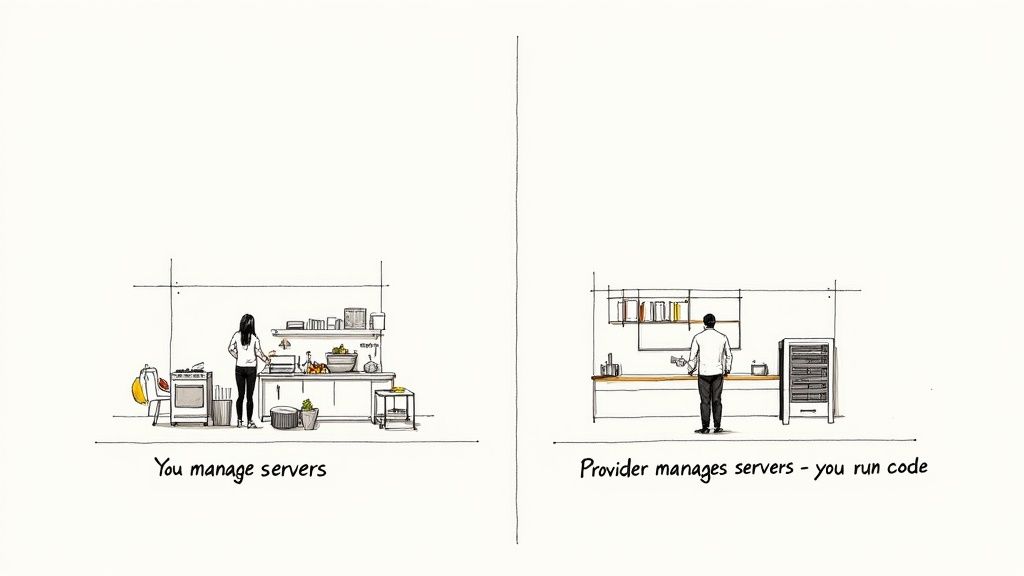
This model isn't just a minor tweak; it's a fundamental shift in how we build and pay for applications. You're no longer owning the kitchen—you're just paying per dish.
The Shift From Provisioning to Execution
In a classic server setup, you have to play a guessing game with capacity. You provision servers to handle potential traffic spikes, which often means paying for a ton of idle compute power during quiet periods. It’s like keeping your home oven on 24/7 just in case you get a sudden craving for a midnight snack.
Serverless completely flips this on its head. There is no pre-provisioning. Instead, resources are allocated on demand, precisely when a function is triggered by an event—like a user uploading a photo or hitting an API endpoint. As soon as the task is finished, those resources are released.
This pay-per-execution model is the core financial and operational advantage of serverless. You stop paying for idle compute time and instead pay only for the exact milliseconds your code is running.
This shift has huge financial implications. The global serverless architecture market was valued at just USD 3,105.64 million in 2017 but is projected to explode to USD 148.2 billion by 2035. This massive growth is fueled by businesses eager to slash infrastructure costs. In many traditional cloud setups, idle server time can account for a staggering 70-80% of the bill. You can dig into the full market analysis on serverless architecture trends and growth.
Key Characteristics of Serverless
To really get what serverless is all about, you need to understand its core principles. It's not just about saving money; it changes how applications are built and deployed from the ground up.
- Abstracted Infrastructure: Developers can finally stop thinking about operating systems, security patches, or server configurations. The cloud provider owns all of that.
- Event-Driven Execution: Functions are stateless and essentially "asleep" until an event wakes them up. This trigger could be an API call, a new file in a storage bucket, or a scheduled timer.
- Automatic Scaling: The platform scales your application by running code in response to every single trigger. If 10,000 users hit your app at once, the platform instantly spins up 10,000 instances of your function to handle the load—no manual intervention required.
This approach is especially powerful when updating older, monolithic applications. For teams looking to make that transition, exploring different legacy system modernization strategies can help map out a clear path for integrating serverless components into an existing system.
Serverless vs Traditional Server Models at a Glance
To make the distinction crystal clear, here’s a quick comparison of how serverless stacks up against a more traditional, server-based model.
| Aspect | Traditional Architecture (e.g., Monolith on EC2) | Serverless Architecture (e.g., Lambda) |
|---|---|---|
| Server Management | You provision, patch, and maintain servers. | The cloud provider manages everything for you. |
| Scaling | Manual or configured auto-scaling groups. | Automatic and inherent; scales per request. |
| Cost Model | Pay for running servers (even when idle). | Pay only for compute time used (per-millisecond). |
| Unit of Deployment | Entire application or service. | Individual functions or small pieces of code. |
| Developer Focus | Code, infrastructure, networking, and OS. | Just the application code. |
Ultimately, the choice between these models comes down to what you want your teams to focus on. Serverless lets developers concentrate on writing features, while a traditional model gives you fine-grained control over the underlying environment.
How Serverless Architecture Actually Works
So, how does serverless really work under the hood? Forget the name for a moment; the core idea is all about responding to events. This is a fundamental shift from traditional servers that sit around, running 24/7, just waiting for something to happen. Serverless functions, on the other hand, are completely dormant until a specific trigger wakes them up.
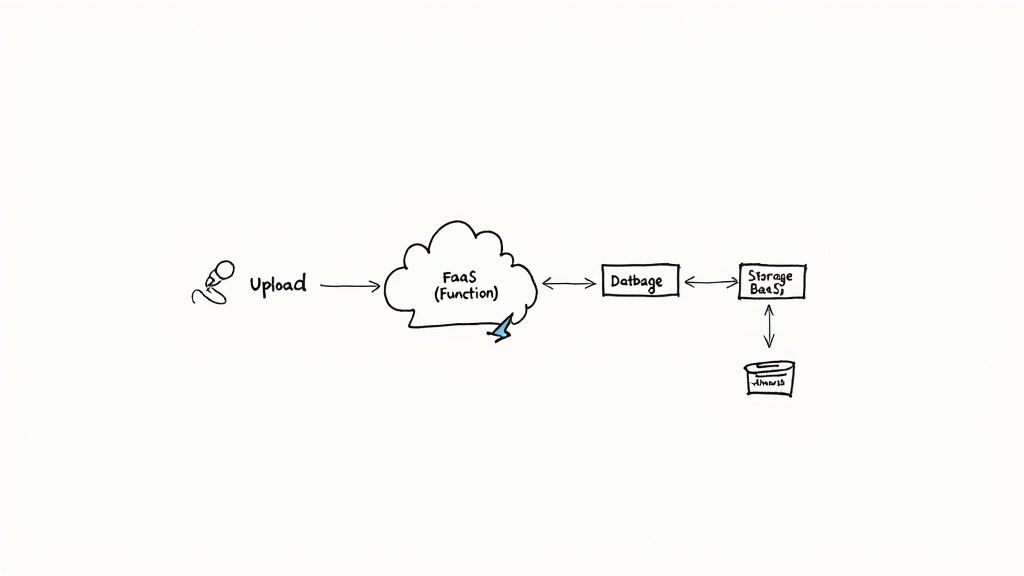
This "trigger" or "event" can be just about anything. It could be a user hitting "submit" on a form, which fires off an API call. Or maybe it's a new photo dropped into a storage bucket, or a customer record getting added to a database. As soon as that event happens, the cloud provider instantly spins up a small, stateless environment to run a piece of code—a function—that you wrote specifically to handle that trigger.
The Two Pillars of Serverless
The whole serverless model really stands on two legs: Functions as a Service (FaaS) and Backend as a Service (BaaS). You need both to build a complete application.
Functions as a Service (FaaS) is the compute part of the equation. This is where your code actually runs. You package your logic into small, single-purpose functions and upload them. The FaaS platform—like AWS Lambda, Google Cloud Functions, or Azure Functions—takes care of everything else. It provisions the container, executes the code when an event comes in, and tears it all down when it's done.
Backend as a Service (BaaS) covers all the other pieces you need but don't want to build yourself. Think of these as off-the-shelf, managed services that plug right into your application. Common BaaS offerings include:
- Databases: NoSQL options like AWS DynamoDB or Google Firestore that scale on their own.
- Authentication: Services like Auth0 or AWS Cognito to handle user identity, logins, and security.
- Storage: Object storage like Amazon S3 for hosting files, images, or static assets.
When you combine FaaS for your custom business logic and BaaS for these common backend needs, you can assemble incredibly powerful applications without ever touching a server.
An Example: The Photo Resizing App
Let's make this concrete with a simple, real-world scenario. Imagine you’re building an app where users can upload photos, and you need to automatically generate thumbnails for their profile pages.
Here’s how the serverless flow would look, step-by-step:
- The Trigger: A user uploads a new profile picture. This action saves the original file to a managed storage bucket (a BaaS component, like Amazon S3). This file upload is our event.
- The Event Notification: The storage service sees the new file and automatically sends out a notification. This message is routed to your FaaS platform.
- Function Execution: The FaaS platform catches the notification and spins up an instance of the specific function you wrote for resizing images.
- The Action: Your function’s code runs. It grabs the new image, resizes it into a thumbnail, and saves that smaller version back into a different storage bucket.
- Completion: As soon as the thumbnail is saved, the function's job is over. The FaaS platform shuts down the container, and you're only billed for the few milliseconds of compute time you actually used.
The real magic here is that the entire process is automated and reactive. You didn't have to provision a server, install image-processing libraries, or worry about scaling. The system just reacted to an event, did its job, and went back to sleep.
This event-driven approach is incredibly efficient. If one person uploads a photo, one function runs. If 10,000 users upload photos at the same time, the platform simply spins up 10,000 parallel instances of your function to handle the load. The scaling is built-in and automatic. This is a big reason why the interplay between microservices and API Gateways is so interesting, as these patterns often work hand-in-hand with serverless.
Of course, managing the communication between all these functions and services requires clean, well-defined interfaces. That’s why following API design best practices is non-negotiable for building serverless applications that are both reliable and easy to maintain.
The Core Benefits and Inherent Trade-Offs
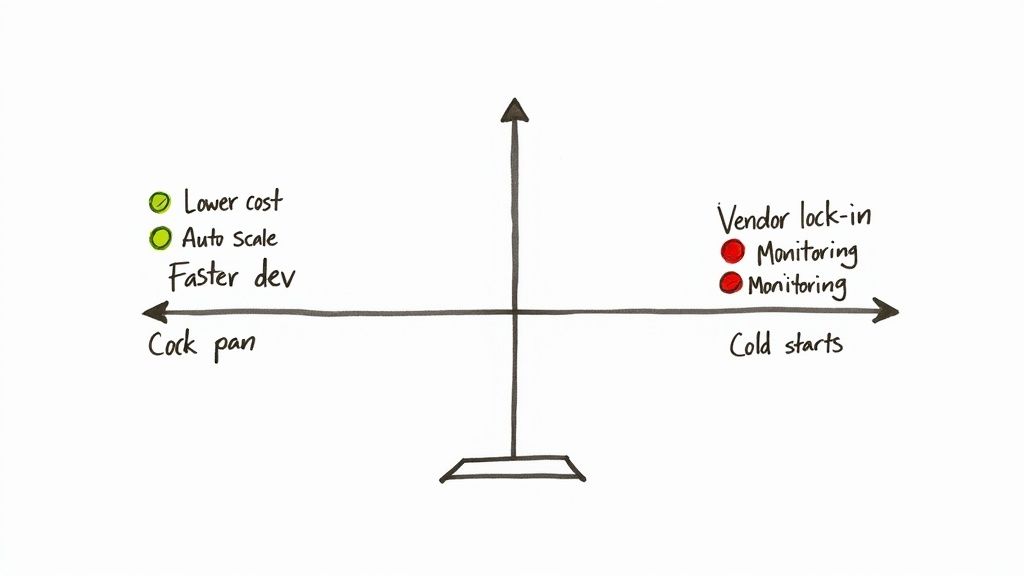
Switching to a serverless architecture can feel like a superpower for your development team. It offers some massive advantages that fundamentally change how you build and ship software. But, like any powerful tool, it’s not without its quirks. Getting a clear picture of both the good and the bad is key to figuring out if serverless is the right move for you.
The most immediate win is how much operational work just disappears. In a traditional setup, your engineers are constantly busy provisioning servers, patching operating systems, and figuring out scaling rules. Serverless completely abstracts that away. Your team gets to focus on one thing: writing code that serves your customers.
This directly translates into moving faster. Instead of getting stuck waiting for infrastructure, developers can write, test, and deploy individual functions in minutes. That means new features and updates get out the door at a much quicker pace.
Unpacking the Primary Advantages
Beyond just speed, the impact on your budget and ability to handle traffic can be huge. The pay-per-use model is often a game-changer, especially if your application traffic is spiky or hard to predict.
- Drastic Cost Reduction: You stop paying for servers to sit idle. With serverless, you're only billed for the exact milliseconds your code is actually running. Coca-Cola, for example, slashed the annual operational cost of a vending machine platform from $13,000 down to just $4,500 after going serverless.
- Infinite, Automatic Scalability: Serverless platforms just scale. If you get a sudden flood of traffic, the provider handles it by spinning up as many function instances as needed, all without anyone on your team lifting a finger.
- Enhanced Developer Productivity: By offloading all the infrastructure management, you let your engineers do what they do best: build great products. This shift from operational chores to core logic is a huge morale and productivity boost.
With serverless, the question is no longer "Can our infrastructure handle this?" but rather "What amazing feature can we build next?" It reorients the entire development mindset toward innovation instead of maintenance.
This blend of lower costs, effortless scaling, and renewed focus makes serverless a really compelling choice for everyone from tiny startups to massive enterprises. For instance, Smartsheet saw an over 80% reduction in latency for a key service after they migrated and fine-tuned their serverless architecture, proving the performance gains are real.
Navigating the Inherent Trade-Offs
Of course, serverless isn't a silver bullet. You have to go into it with your eyes open, fully aware of its limitations. The trade-offs usually pop up around control, complexity, and some unique performance behaviors.
One of the first things people bring up is vendor lock-in. Your functions are built to work with a specific cloud provider’s ecosystem (like AWS Lambda and S3). If you ever want to switch clouds, you're looking at a serious engineering project to rewrite code and reconfigure everything.
Another real-world hurdle is the added complexity of monitoring and debugging. A serverless app is a distributed system made of many tiny, independent pieces. Trying to trace a single user's request as it jumps between multiple functions and services can feel like finding a needle in a haystack without the right observability tools.
The Cold Start Conundrum
Finally, there’s the infamous "cold start." If a function hasn't been used in a while, the cloud provider puts its container to sleep to save resources. The next time that function is called, there’s a small delay while a new environment is spun up, your code is loaded, and it finally runs. This latency is often just a few hundred milliseconds, but for a user-facing app where every moment counts, that can be a deal-breaker.
Here’s a quick breakdown of the challenges to keep in mind:
| Trade-Off | Description | Potential Impact |
|---|---|---|
| Vendor Lock-In | Functions and services are tightly coupled to a specific cloud provider's ecosystem. | Migrating to a different cloud provider becomes a complex and costly project. |
| Observability | Debugging and monitoring a distributed system of functions can be difficult. | Pinpointing errors and performance bottlenecks requires specialized tools and expertise. |
| Cold Starts | There can be initial latency when a function is invoked after a period of inactivity. | May affect the performance of real-time, user-facing applications sensitive to delay. |
| Execution Limits | Cloud providers impose limits on function execution time and memory allocation. | Unsuitable for long-running, computationally intensive tasks without architectural workarounds. |
Ultimately, the decision comes down to weighing the incredible upside in cost and scalability against these very real operational challenges.
Comparing Serverless with Other Architectures
To really get a feel for what serverless brings to the table, it helps to see how it stacks up against other ways of building software. There's no single "best" architecture; the right choice always depends on the problem you're trying to solve. Let's pit serverless against two other heavyweights: the traditional monolith and the more modern containerized microservices.
This isn't just a technical deep-dive. We'll look at what each model actually means for your team's workflow, your budget, and how easily your product can grow. And since serverless is born from the cloud, understanding the fundamental differences between on-premises and cloud infrastructure is a great starting point.
Serverless Versus the Monolith
Think of a monolithic architecture as the classic way to build an application. It’s like a giant, single-story office building where every department—from sales to accounting—is under one roof. All the code is woven together into one large, interconnected system that gets deployed as a single unit.
At first, this is beautifully simple. You have one codebase to worry about and one application to launch. But as your application gets bigger, that simplicity starts to crumble and becomes a major drag on your team.
Making a tiny change in one corner of the code means you have to test and redeploy the entire building. It's slow and risky. Scaling is also a blunt instrument. If your sales team gets a flood of new leads, you have to beef up the entire office, even if the other departments are quiet. It’s a wasteful, all-or-nothing approach.
In stark contrast, serverless is like setting up a fleet of small, specialized food trucks. Each truck (a function) does one thing really well, runs completely on its own, and only fires up the grill when a customer (an event) walks up to the window. This gives you an agility and cost efficiency that monoliths just can't touch.
Serverless Versus Containerized Microservices
A more head-to-head comparison is between serverless and containerized microservices, which are often wrangled by an orchestrator like Kubernetes. The microservices approach breaks that big monolith into smaller, independent services, each neatly packaged in its own container. This was a massive leap forward for agility and scaling.
Containers give you a ton of control. You get to pick the operating system, fine-tune the runtime environment, and meticulously allocate resources. Kubernetes is an incredibly powerful tool for managing all these containers, handling everything from scaling to networking. But all that power and control come with a hefty price tag: operational complexity.
Let's be real: managing a Kubernetes cluster is a full-time job. Your team is on the hook for configuring the cluster, patching nodes, setting up network policies, and keeping the lights on for the underlying infrastructure. It's a powerful system, but it's a long way from "zero management."
Serverless takes the core idea of microservices and pushes the abstraction a step further. It asks, "What if you didn't have to manage the containers or the cluster at all?" With serverless, you just hand over your function's code. The cloud provider takes care of everything else—spinning up a container, managing the runtime, and scaling it to meet demand, all completely automatically.
Architectural Showdown: Monolith vs. Microservices vs. Serverless
So, how do you choose? It really boils down to what you value most: fine-grained control, raw speed, or minimizing operational headaches. The table below breaks down the key differences.
Architectural Showdown Monolith vs Microservices vs Serverless
| Criteria | Monolithic Architecture | Containerized Microservices (e.g., Kubernetes) | Serverless Architecture (FaaS) |
|---|---|---|---|
| Operational Overhead | High (manage servers, OS, and the application) | Very High (manage cluster, nodes, containers, and services) | Extremely Low (provider manages pretty much everything) |
| Scalability | Coarse-grained (scale the entire app as one block) | Fine-grained (scale individual services independently) | Automatic and event-driven (scales from zero per request) |
| Cost Efficiency | Low (you're always paying for idle servers) | Medium (better utilization, but the cluster itself costs money) | High (you only pay for the milliseconds of execution time) |
| Deployment Speed | Slow (deploying the whole application takes time) | Fast (you can deploy individual services quickly) | Instantaneous (deploying a single function is nearly instant) |
| Developer Control | Full control over the entire environment | High control over the container and cluster configuration | Limited to the function's code and its specific configuration |
At the end of the day, it's all about trade-offs. Monoliths still have their place for simple projects where you want to get started quickly. Containers give you the granular control needed for complex systems where you must manage the environment yourself. And serverless? It offers unmatched speed and efficiency, letting your team focus purely on writing code that delivers value. For a broader view, our guide on software architecture design patterns explores where each of these models fits into the bigger picture.
Real-World Serverless Use Cases and Examples
It's one thing to talk about serverless in theory, but its real power clicks when you see it in action. This isn't just a buzzword; it's the architectural foundation for some of the most efficient applications on the web today. Companies of all sizes, from tiny startups to massive enterprises, are using serverless to solve complex problems faster and more cheaply than ever before.
Let's dive into some practical scenarios where going serverless isn't just a good idea—it’s a total game-changer. We'll look at everything from building blazing-fast web APIs to processing massive streams of IoT data, giving you a clear picture of what's possible.
Dynamic Web APIs and Microservices
One of the most popular uses for serverless is building the backend for web and mobile applications. Instead of keeping a big, monolithic server running around the clock, you break down your API into a collection of small, independent functions. Each function handles a single job.
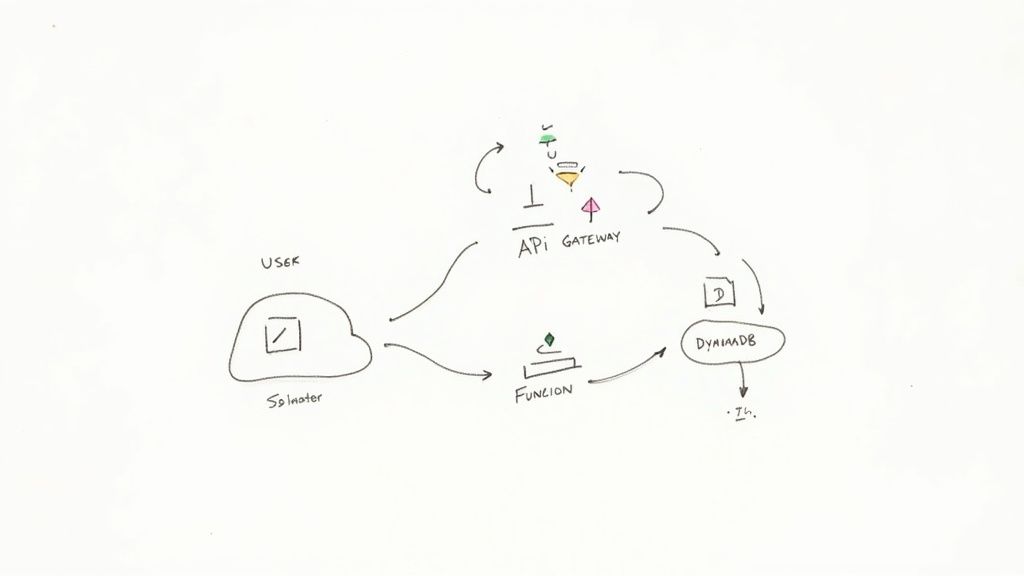
Think about a user signing up for your service. Their request hits an API Gateway, which routes it to a specific createUser function. That function takes over, validates the user’s information, writes it to a serverless database like Amazon DynamoDB, and sends back a "success" response. Every part of your API—from authenticating users to fetching product data—lives as its own isolated, scalable function.
This is where the efficiency really shines. If your
getProductsendpoint gets slammed with a million requests, only that function scales up. Meanwhile, yourdeleteUserendpoint, which is rarely used, costs you virtually nothing. You pay only for what you actually use.
Real-Time Data and Event Processing
Serverless is tailor-made for reacting to things as they happen. This makes it a perfect match for processing streams of data from sources like IoT sensors, application logs, or clicks on a website. Because serverless is inherently event-driven, you can build powerful, responsive data pipelines without getting bogged down in managing infrastructure.
Here are a few powerful examples:
- IoT Data Ingestion: Imagine a sensor on a factory floor sends a new temperature reading. This event instantly triggers a function that processes the data, flags any anomalies, and saves the result for analysis—all in milliseconds.
- Log Analysis: As your application produces logs, they can be streamed to a service that triggers a function for each new entry. The function can scan for critical errors and immediately fire off an alert to your on-call team.
- E-commerce Order Processing: When a customer places an order (the event), a cascade of functions can kick off to update inventory, send a confirmation email, and notify the warehouse to start packing.
Business Process and IT Automation
Beyond customer-facing apps, serverless is an amazing tool for automating all the internal workflows and routine IT chores that keep a business running. These tasks are often short, periodic, and triggered by an event, making them a perfect, low-cost fit for the serverless model.
You can easily automate critical but repetitive jobs, such as:
- Scheduled Report Generation: A timer can trigger a function every night to query your database, assemble a daily sales report, and email it directly to stakeholders.
- CI/CD Pipeline Automation: When a developer pushes new code, it can trigger a function that starts a build, runs all the automated tests, and deploys the new version if everything passes.
- Chatbots and Voice Assistants: Each message from a user can be treated as an event. A serverless function processes the text, figures out what the user wants, and crafts a response, scaling seamlessly no matter how many people are chatting at once.
And this is just scratching the surface. From processing video files on the fly—like Netflix does for its media encoding—to powering on-demand services, serverless provides a remarkably flexible and cost-effective foundation for building modern software.
Ready to Build? Let's Get Your First Serverless Project Off the Ground
Alright, enough theory. Let's talk about putting this into practice. Getting your first serverless project up and running is where the real learning happens, and it’s often a surprisingly fast path to seeing tangible benefits like quicker development cycles and lower operational costs.
This last section is all about your first steps. We'll walk through a practical roadmap, covering the core strategies and tools you'll need to build with confidence and sidestep the common traps that trip people up. Remember, this isn't just about writing code differently; it's about shifting your mindset on how you structure, deploy, and maintain applications.
The Smart Way to Start: The Strangler Fig Pattern
So where do you begin? For most teams, especially those with existing applications, diving into a complete rewrite is a non-starter. It’s just too risky and takes too long. A much smarter, battle-tested approach is the Strangler Fig Pattern.
Think of it like this: you gradually wrap new, modern serverless functions around your old monolithic application. Over time, these new services intercept traffic and handle functionality, effectively "strangling" the old system piece by piece.
For example, you could identify a single, heavily used API endpoint in your monolith. Your first project could be to rebuild just that endpoint as a serverless function. You then reroute traffic for that specific endpoint to your new function, leaving the rest of the application completely untouched. This method lets you migrate incrementally, deliver value almost immediately, and learn from small, manageable steps.
You Can't Fix What You Can't See: Mastering Observability
One of the biggest mental shifts when moving to a distributed architecture is figuring out what’s going on when things break. A single user request in a serverless app might trigger a whole chain of events, bouncing between multiple functions, databases, and third-party APIs. This makes observability absolutely essential.
Without a solid observability setup, you’re basically flying blind. Debugging becomes a frustrating guessing game. To do this right, you need to focus on three core pillars:
- Logging: Don't let your logs stay isolated in each function. Pipe them all into a centralized, searchable platform so you have one place to see the full story of what's happening across your system.
- Monitoring: Keep an eye on the vital signs. Track key metrics like how long functions take to run, how often they fail, and how many times they're invoked. Set up alerts to get pinged when something looks off.
- Tracing: This is your secret weapon. Distributed tracing lets you follow a single request as it travels through your entire system. It’s the best way to find performance bottlenecks and see exactly how all your services interact.
Getting these practices in place isn't just a "nice-to-have." For any serious, production-ready serverless application, it's a non-negotiable. It’s what transforms a complex, black-box system into something you can actually manage.
Finding Your Tools and Platform
Last but not least, you need to pick your toolkit. The serverless world is full of options, but a handful of major players form the foundation for most projects.
The big three cloud providers are where most people start:
- AWS Lambda: The original and still the market leader. It has a massive ecosystem and integrates with just about every other AWS service you can imagine.
- Google Cloud Functions: A fantastic choice if you're already in the Google Cloud ecosystem, with especially tight integrations for data and machine learning workflows.
- Azure Functions: The go-to for teams heavily invested in the Microsoft stack, offering first-class support for .NET and a seamless developer experience.
On top of these platforms, you'll want a tool to make your life easier. Something like the Serverless Framework is a game-changer. It's an open-source tool that lets you define all your functions, their triggers, and the cloud resources they need in a single configuration file. This makes deploying and managing your entire application as code incredibly straightforward. Getting the right combination of cloud provider and tooling will set you up for success right from the start.
Answering Your Top Questions About Serverless
As you start digging into serverless, a few common questions almost always pop up. Let's clear the air and get straight to the practical answers that will help you understand what this model is all about.
If There Are Still Servers, Why Call It "Serverless"?
This is probably the most common question, and for good reason! The name is a bit of a misnomer. Of course, there are still servers—your code has to run somewhere.
The term "serverless" describes the developer's experience. You, as the developer, don't have to think about those servers. You're not provisioning them, patching them, scaling them, or even ssh-ing into them. The cloud provider handles all of that heavy lifting completely behind the scenes. Your focus shifts from managing infrastructure to just writing code.
What's the Difference Between FaaS and Serverless?
It’s easy to mix these two up, but they aren't the same thing. Think of it this way: Functions as a Service (FaaS) is a core component of a serverless strategy, but it's not the whole picture.
- FaaS is the compute layer. It's the engine that runs your code in short-lived, event-triggered bursts. AWS Lambda is the classic example here.
- A true serverless architecture is much bigger. It combines FaaS with a suite of other managed services, often called Backend as a Service (BaaS). This includes things like serverless databases (Amazon DynamoDB), object storage (Amazon S3), and authentication services (AWS Cognito).
FaaS is the engine, but BaaS provides the chassis, wheels, and steering. You need all the parts working together to build a complete application.
Serverless is more than just functions; it’s an entire architectural philosophy built on using managed cloud services to get the job done without touching a single server.
Is Serverless Always Cheaper?
Not necessarily, and this is a critical point to understand. The cost-effectiveness of serverless shines brightest for workloads with spiky or unpredictable traffic. If your application sees huge bursts of activity followed by long periods of silence, you'll save a ton of money because you only pay for the exact compute time you use. No more paying for idle servers.
However, if you're running a high-traffic application with a constant, predictable load, a fleet of provisioned servers running at near-100% capacity might actually be cheaper in the long run. The key is to analyze your workload's traffic patterns to make the right financial call.